Everything you need to know about Amazon Bedrock AgentCore IdentityAuthentication and authorization for AI agents on AWS
Published
We build production AI agents on AWS at Loka. I wrote this after losing more than one afternoon to the auth model below. Everything here was checked against the AWS documentation as of September 2026.
This is the complete guide. It’s long, and it’s built to be skimmed and bookmarked as much as read straight through. About 90 minutes end to end, or ten if you use the contents below to find the one section you came for.
Every AI agent worth deploying eventually has to touch something private.
A user’s Google Drive, a Slack workspace, an internal API with real customer data in it, another agent, an MCP server behind a Gateway, and the list goes on and on. The moment your agent stops being a chatbot and starts being useful, it needs credentials, and you’ve inherited two hard questions.
1.Who is allowed to call your agent?
2.How does your agent prove itself to everything it calls?
On AWS the machinery for both is Amazon Bedrock AgentCore, the managed platform for deploying and operating agents, and specifically AgentCore Identity, its auth layer.
Those two questions have almost nothing to do with each other. Different components enforce them, and they fail in ways that look nothing alike. Blur them together and you end up debugging the wrong half of the system: an inbound authorizer that was fine all along, when the actual fault was a missing Secrets Manager grant on the outbound side.
What the system does is spread across a lot of separate documentation pages, and some of what you need to know isn’t in them at all. That’s why this guide exists in the shape it does: one article, in the order you’d actually build things, with my own test results wherever the docs are silent.
Every so often you’ll hit a short “test your understanding” box. If the questions in one are easy, skip ahead; if they aren’t, the section above them is the one to reread. The answers are all collected at the end.
Contents #
The model
- Inbound vs. outbound
- What AgentCore Identity actually is
- Every API action in this guide
- Three kinds of token
- Test your understanding
Where your agent runs
- What the Runtime does, and what you take over
- What the Runtime actually injects
- With no token, the decorator guesses
- Getting a token when the platform won’t give you one
- The parts that matter
- Test your understanding
Inbound
Outbound
- A fast OAuth primer
- The target picks the mechanism
- Case 1: the target wants nothing
- Case 2: the target wants an API key
- Who’s actually allowed to read it
- Test your understanding
Acting as a user
- Case 3: three ways to act as a user
- Originating a fresh token with 3LO
- The first time a user connects, and the two callback URLs
- Session binding
- A recipe you can copy
- Who actually hosts endpoint (b)
- What your tool is doing while the user consents
- The same flow without the decorator
- Forwarding a token you already hold: JWT passthrough
- Test your understanding
- Exchanging for a new audience: OBO
- When user identity can’t arrive inbound: the User-Id header
- Test your understanding
No user at all
The plumbing
- What the workload access token actually is
- The three on-ramps for minting one
- Step zero: do you already have one?
- Mint and spend, in code
- When the Runtime hands you nothing
- The short version of the plumbing
- Test your understanding
Reference
- Every API call, in every mode
- The outbound mechanisms, compared
- When do you need your own workload identity?
- Which mechanism do I use?
- When it breaks: inbound or outbound?
- Edges and limits
- FAQ
- If you’re starting today
- Further reading
- Test your understanding: the answers
The model #
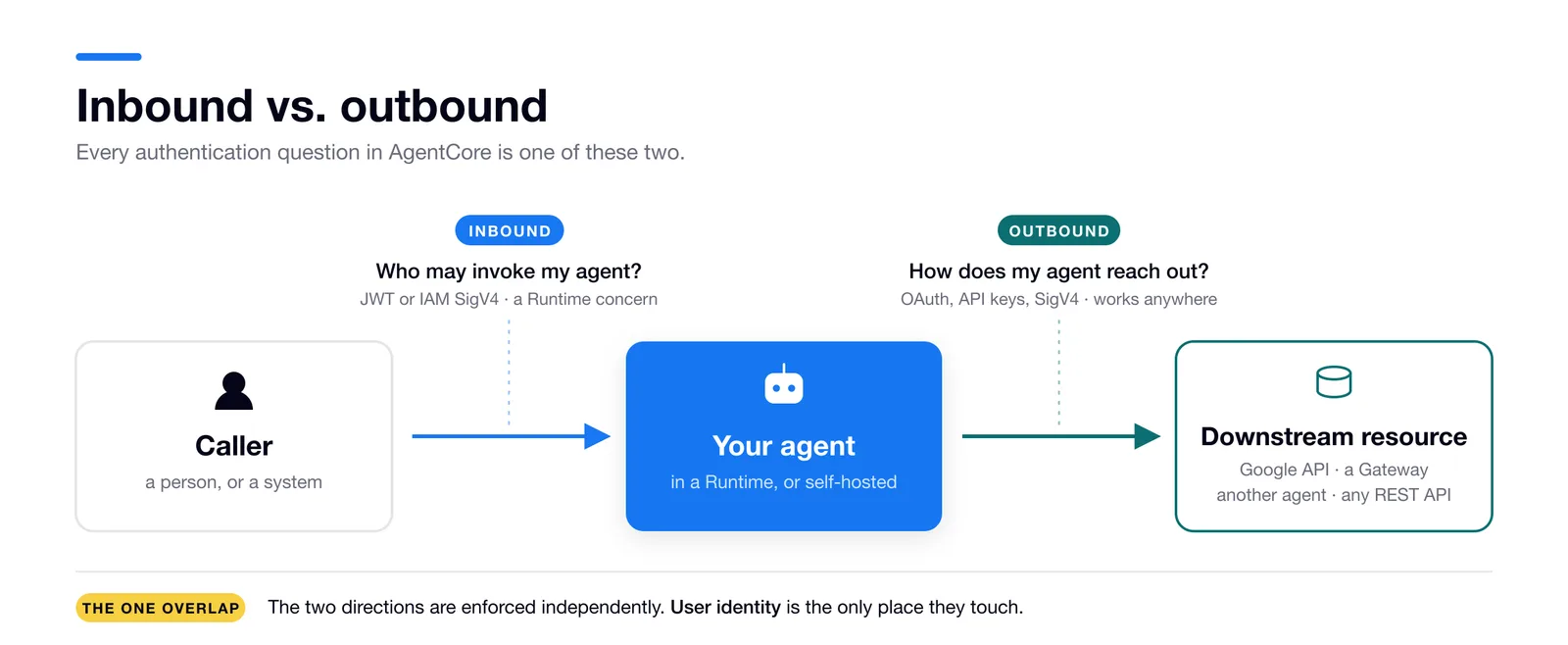
Every authentication question in AgentCore is one of two questions.
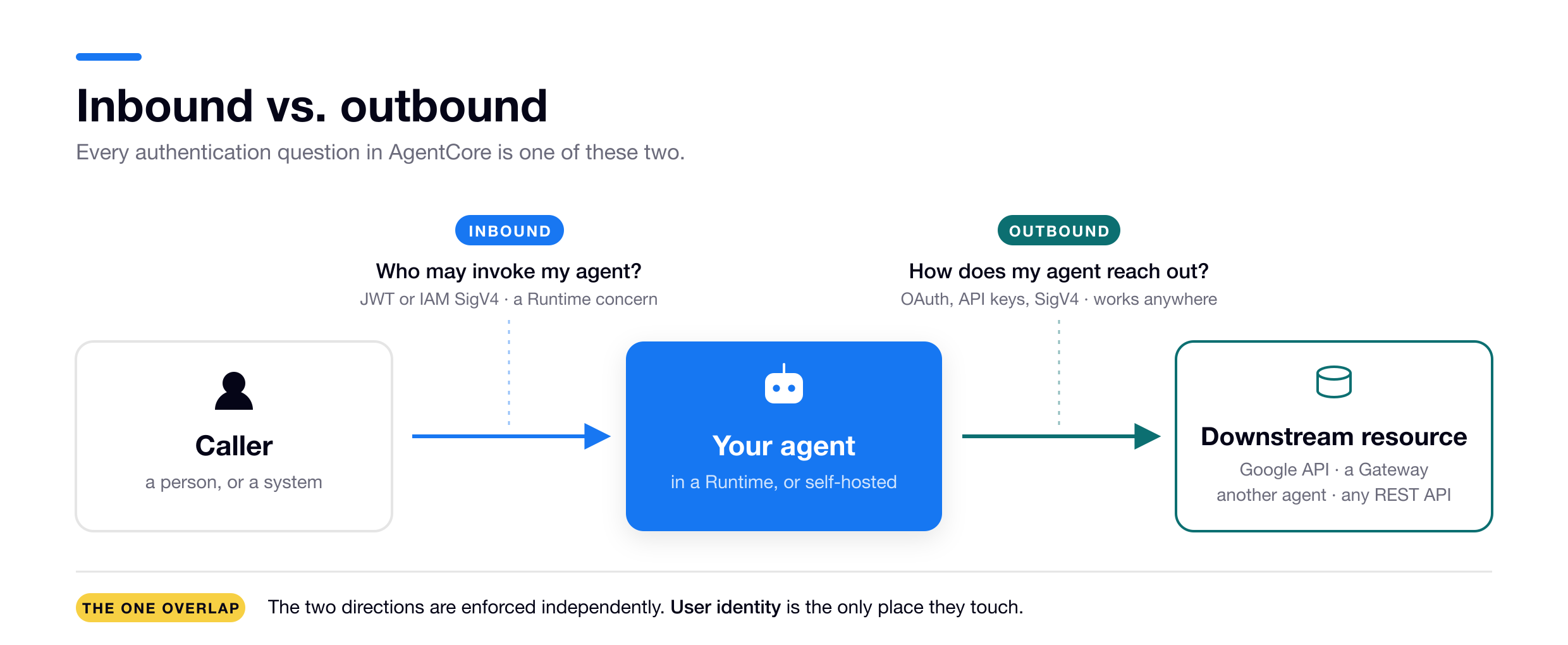
Inbound controls who can invoke your agent. That caller is often a person in a chat app, but it’s just as often a system: a backend service, a cron job, another agent. The authorizer on the Runtime hosting your agent is what enforces it. So inbound is only an AgentCore question when your agent runs on a Runtime. A bare script you run yourself has no AgentCore authorizer in front of it. Whatever calls that script is outside AgentCore’s control completely.
(Gateways have their own inbound authorizer, but that one decides who may call the Gateway. Your agent sees a Gateway as a downstream target, so it lands under outbound.)
Outbound controls what your agent can reach and on whose behalf. AWS frames it as acting either on behalf of the user or on the agent’s own behalf, in their supported authentication patterns. Outbound has no dependency on the Runtime. The credential providers and the Token Vault (if these names are new to you, don’t worry, you’ll meet them in a minute) work from any process that has AWS credentials.
These are not one system, however often they get treated as one. The credential providers and Token Vault exist only for outbound and have zero say in who’s allowed to call your agent. You can run IAM inbound with OAuth outbound, or JWT inbound with IAM outbound. Any combination is legal, because the two sides never consult each other.
They’re enforced independently but they do touch at one point, and that point is user identity.
If your agent only ever acts as itself, mix inbound and outbound freely. If it acts on behalf of a user, that user’s identity has to reach the outbound call somehow. There are three ways it can arrive: a verified inbound JWT, an unverified header, or a value you assert yourself when self-hosting. Which one you’re in decides a lot, and it gets a section of its own later.
When something breaks, ask this before anything else: is the caller failing to get in, or is my agent failing to reach out? There’s a symptom table further down, but asking the question is most of the work.
What AgentCore Identity actually is #
Both directions. On the inbound side it powers the authorizer that decides who may invoke your agent. On the outbound side it manages the credentials your agent uses to reach other systems.
The inbound side only exists when your agent runs on an AgentCore Runtime, or when you put a Gateway in front of a target. The inbound authorizer is not a standalone Identity resource you create on its own. It’s configuration you attach to a Runtime or a Gateway, the authorizerConfiguration field on CreateAgentRuntime and CreateGateway.
A self-hosted agent has no AgentCore authorizer at all. For that agent, AgentCore Identity is only the outbound half.
The outbound pieces are standalone infrastructure that works wherever your code runs. There are three of them, and they differ in who provisions them: the directory is always automatic, credential providers are always yours to create, and workload identities are usually automatic but sometimes yours.
The Agent Identity Directory, which you never create
The Agent Identity Directory is a per-account registry of workload identities. A workload identity is the underlying identity of an agent or app.
There’s exactly one directory per account and it’s created automatically with the first identity. You never call an API to get the directory itself.
The identities inside it are a different story. When your agent runs on a Runtime, or when you create a Gateway, that resource gets a service-managed workload identity automatically, and most agents use only that one. Sometimes you create your own with CreateWorkloadIdentity instead, and not only when self-hosting.
There are four cases where you’d create one yourself, but they need vocabulary I haven’t introduced yet, so the list is in the reference section. The one you’re most likely to hit has verified code further down.
Credential providers, which are always yours to create
Credential providers are reusable configs describing how to authenticate to an external service. Register one and AgentCore runs the flows and the refreshes for you.
You get 24 built-in vendor integrations (Google, GitHub, Slack, Salesforce, Microsoft, Okta, Auth0, Cognito, Atlassian, LinkedIn and more), a CustomOauth2 escape hatch for any OAuth2 server, and an API-key provider for services that don’t speak OAuth. There’s also a separate payment provider type, CoinbaseCDP and StripePrivy, created through its own create-payment-credential-provider API.
Credential providers are outbound only.
They represent systems the agent reaches out to. They are not configuration for who may call your agent. If you want your agent to read a user’s Google Drive, you configure a credential provider. If you only want to use Google as an inbound IdP for your agent, you do not need one, you configure a JWT authorizer instead.
The Token Vault, also provisioned for you
The Token Vault is encrypted storage for the actual credentials. AWS says it “ensures credentials can only be accessed by the specific agent and user combination that originally obtained them,” with KMS encryption at rest and in transit. Tokens are scoped to an agent + user pair for user-delegated access, or to the agent alone for machine-to-machine.
An example makes it concrete. Say you have an agent that builds PowerPoint decks and saves them to a user’s Google Drive. You create the Google credential provider. Bob asks the agent to save his deck. The agent runs the OAuth flow, and the access token Google returns lands in the Token Vault.
Getting it back out, from inside the agent, is one API call. There are two of them and the credential type picks which:
GetResourceOauth2Tokenfor anything OAuth, so Bob’s Google token here, and equally a machine token or an exchanged one.GetResourceApiKeyfor a stored API key.
Both take the name of the credential provider you’re reaching for, plus proof of who’s asking. That proof is the third of the three tokens in the next section, and it’s the piece that makes the Vault return Bob’s row rather than Alice’s. Two things wrap those calls in practice: SDK decorators that make the whole fetch invisible, or the raw calls when you want the control. Both are covered properly later, including the extra step 3LO needs for first-time consent. For now it’s enough to know the Vault has exactly two doors.
Think of the Vault as an encrypted key-value store where the key is (agent’s workload identity + user id) and the value is the access token. When Alice asks for the same thing she gets her own row. The Vault itself is never something you stand up or configure.
Every API action in this guide
The surface is smaller than the documentation makes it look. Everything below appears somewhere in this guide, and it splits cleanly in two: control-plane calls in bedrock-agentcore-control that you make once when setting things up, and data-plane calls in bedrock-agentcore that run on every request. Skim it now for the shape and come back when you need a parameter.
One thing to define first, because two of the calls below refer to it. A user-consent flow ends with the provider redirecting the browser back somewhere, and there are two such URLs, which the docs unhelpfully both call a “callback URL.” Call them (a), the AWS-hosted URL you register with Google or whoever the provider is, and (b), an endpoint in your own app that AgentCore redirects to afterwards. The section on first connects does them properly; for now, (a) is AWS’s and (b) is yours.
Setup, on the control plane. Mostly one-time, mostly infrastructure-as-code.
| Call | Why you’d make it | Parameters that matter | What the next call needs from it |
|---|---|---|---|
CreateWorkloadIdentity | Register an agent in the Agent Identity Directory yourself, rather than letting a Runtime do it | name, allowedResourceOauth2ReturnUrls | The identity’s name, which becomes workloadName on every mint call |
UpdateWorkloadIdentity | Register endpoint (b) after the fact, which on a Runtime is the only option, since the identity doesn’t exist until you deploy | name, allowedResourceOauth2ReturnUrls | Nothing, but 3LO won’t redirect to (b) until this is set |
ListWorkloadIdentities | Find what got created for you, including anything the SDK decorator fabricated | maxResults, nextToken | The name of the service-managed identity, so you can update it |
CreateOauth2CredentialProvider | Store an OAuth client for Google, Slack, your own IdP | name, credentialProviderVendor, oauth2ProviderConfigInput (client id and secret) | The provider name → resourceCredentialProviderName, and callbackUrl → endpoint (a), which you paste into the IdP |
CreateApiKeyCredentialProvider | Store a static API key | name, apiKey, or apiKeySecretSource + apiKeySecretConfig to point at a secret you own | The provider name, plus apiKeySecretArn, the secret your role needs secretsmanager:GetSecretValue on |
CreateAgentRuntime · CreateGateway | Where authorizerConfiguration lives, so this is where inbound auth is decided | authorizerConfiguration, and on a Gateway authorizerType | A service-managed workload identity, created for you and named after the runtime id |
Per request, on the data plane. Mint one token, spend it for another.
| Call | Why you’d make it | Parameters that matter | What it returns |
|---|---|---|---|
GetWorkloadAccessToken | Mint with no user in the picture, for an API key or a machine token | workloadName | workloadAccessToken, agent-only |
GetWorkloadAccessTokenForJWT | Mint from a user’s inbound JWT | workloadName, userToken | workloadAccessToken, bound to that user |
GetWorkloadAccessTokenForUserId | Mint from an opaque user id, which is the User-Id header path | workloadName, userId | workloadAccessToken, bound to that user |
GetResourceOauth2Token | Spend it for any OAuth credential: 3LO, M2M, OBO | resourceCredentialProviderName, workloadIdentityToken, oauth2Flow, scopes (required even when empty), resourceOauth2ReturnUrl (endpoint b), then sessionUri on the re-call. Also audiences, customState, forceAuthentication | accessToken. On a first 3LO connect, authorizationUrl and sessionUri instead |
GetResourceApiKey | Spend it for a stored API key | resourceCredentialProviderName, workloadIdentityToken | apiKey |
CompleteResourceTokenAuth | Close the 3LO loop from endpoint (b), after checking the browser session | sessionUri, userIdentifier (a userToken or a userId, and which one is not a free choice) | Nothing useful. Its effect is to write the provider token into the Vault |
InvokeAgentRuntime | Call the agent | agentRuntimeArn, payload, runtimeSessionId, and runtimeUserId for the X-Amzn-Bedrock-AgentCore-Runtime-User-Id header | Your agent’s response |
Read down the second table and you have the whole outbound flow. A mint call takes the workloadName from CreateWorkloadIdentity and gives you a workloadAccessToken. A spend call takes that token as workloadIdentityToken, plus the resourceCredentialProviderName from whichever provider you created, and gives you the credential your tool actually sends downstream. First-time 3LO is the one place the chain forks: the spend call hands back an authorizationUrl and a sessionUri rather than a token, and only after endpoint (b) has called CompleteResourceTokenAuth with that sessionUri does re-calling the spend produce an accessToken.
Some names you’ll meet in IAM policies aren’t operations at all and have no reference page of their own. bedrock-agentcore:InvokeAgentRuntimeForUser is the permission for invoking with a User-Id header, and bedrock-agentcore:InvokeGateway is the one for reaching a Gateway. You grant them; you don’t call them. secretsmanager:GetSecretValue belongs to Secrets Manager rather than AgentCore, which is exactly why it’s so easy to miss.
Three kinds of token #
There are three completely different tokens in an AgentCore flow.
Two OAuth roles are worth naming before the list, because your agent plays both. A resource server holds something protected and has to validate a token before serving it. A client holds a token and presents it to the resource server. Which of the two your agent is depends on the call you’re looking at, and the OAuth primer works that through.
- Inbound JWT. The token that whatever invokes your agent (the OAuth client) has to present in order to invoke it, whether that’s a chat front end, a backend service, or another agent. The caller’s IdP issues it (Cognito, Auth0, Okta) and it identifies the caller, usually the end user sitting behind that application. Your agent is the resource server here, and its authorizer is what validates the token. There is no inbound JWT when inbound is IAM, because then the caller proves itself with a SigV4 signature instead.
- Provider access token. The token your agent has to present to an outbound system in order to reach it: Google, Slack, a partner API. Your agent is the client in this exchange, not the resource server, and this is the credential your tool actually puts on the downstream request. The external service issues it, and the Token Vault is what stores it, keyed to your agent and, when there is one, the user.
- Workload access token. The key your agent uses to get the provider access token out of the Vault. AWS issues it, it represents your agent bound to a user when there is one, and it authorizes AgentCore Identity API calls and nothing else. More on it below, and the full mechanics come later.
Keeping them apart is what makes an error message readable: a rejected inbound JWT is an authorizer problem, a rejected provider token is a scope or audience problem at the downstream, and a failure to get a workload access token is almost always IAM.
What the workload access token is for
AgentCore will not hand you a provider access token unless you first present a workload access token proving which agent, plus which user, is asking. That’s how the Vault knows whose Google credential to return. It exists only to authorize your agent against AgentCore’s own services, the Token Vault and the credential providers. AWS is blunt about the boundary: it’s “exclusively for accessing AWS first-party AgentCore services and cannot be used for external services.”
Using it takes two steps. First you mint one from whatever identity you have, with a GetWorkloadAccessToken* call. Then you spend it, passing it as the workloadIdentityToken argument to GetResourceOauth2Token or GetResourceApiKey, and AgentCore returns the provider access token out of the Vault.
On a Runtime both steps are automatic. The platform mints the token and injects it into your request, the SDK decorator spends it, and your code never sees it. Self-hosted, you do both yourself. The full mechanics, including all three ways to mint one, come later.
What to carry forward
Inbound and outbound are separate systems. Inbound lives on the Runtime or the Gateway. Outbound lives in the Token Vault and works anywhere you have AWS credentials. They meet at user identity and nowhere else.
You never provision the directory or the Vault. Credential providers you always create yourself. Workload identities sit in between: the Runtime or Gateway usually hands you one, but you’ll create your own when you need a token that a service-managed identity can’t mint.
The three tokens are the inbound JWT, the provider access token and the workload access token.
Test your understanding
- What’s the difference between inbound and outbound authorization in AgentCore Identity?
- What are AgentCore Identity’s core primitives and what’s the purpose of each one?
- What are the three kinds of token in AgentCore Identity and what is each one used for?
What the Runtime does, and what you take over #
Start from a claim in the AWS docs:
AgentCore Identity’s outbound features are not tied to the AgentCore Runtime at all.
AWS is explicit that identity works “whether your agents run on AgentCore Runtime, self-hosted environments, or hybrid deployments” (key features).
So if the credential machinery runs fine without a Runtime, it’s worth pinning down what the Runtime actually contributes.
What the Runtime does for identity
Three things, in order, on every invocation.
- It validates the caller and extracts an identity. The inbound authorizer checks the JWT and pulls
issandsubout of it, or under IAM inbound reads a header naming the user. - It resolves your agent’s workload identity. Created for you when the runtime resource was created, named after the runtime id.
- It mints a workload access token binding those two together, and injects it into your request as a header.
Then it stops. Credential providers, the Token Vault, the SDK’s credential decorators, the whole outbound half: none of that is Runtime machinery. It’s ordinary API calls against AgentCore Identity, and they behave the same whether the caller is a container on a Runtime or a script on your laptop.
Everything you inherit when you self-host is on that list.
What you take over when you self-host
| Concern | On an AgentCore Runtime | Self-hosted (local script, plain Lambda, EC2/ECS, any AWS-credentialed app) |
|---|---|---|
| Workload (agent) identity | One is created and service-managed for you at resource creation, named after the runtime id. You can create your own as well, and sometimes have to (next row but one). | You create it with CreateWorkloadIdentity (API/CLI/SDK). If you use the SDK decorator and no workload access token is in its request context, it will create one for you and cache its name in a file next to your code, .agentcore.json. That behaviour has real hazards, below. |
| Inbound identity extraction | The authorizer validates the inbound JWT and takes iss + sub from it. Under IAM inbound it instead reads X-Amzn-Bedrock-AgentCore-Runtime-User-Id, an unverified header the caller sets to name the end user. | No authorizer exists. You assert the user identity when you call GetWorkloadAccessTokenForJWT, passing a JWT, or GetWorkloadAccessTokenForUserId, passing an opaque string. |
| Workload access token | Minted and injected as a request header, but only when the Runtime has an identity to bind it to: JWT inbound, or IAM inbound plus the User-Id header. Under plain IAM SigV4 with no User-Id, nothing is injected. | You call GetWorkloadAccessToken* yourself (or the SDK decorator does). |
| Which identity you can mint a token against | Not the service-managed one. The identity the Runtime created for itself is blocked from GetWorkloadAccessToken*, so the token can’t be extracted and replayed. A workload identity you created is not blocked, and minting against it works from inside a Runtime. | Any workload identity you created. Nothing is blocked, because nothing is service-managed. |
| Credential providers, Vault, decorators | Work out of the box on top of the injected token. | Fully supported, once you’ve done the manual identity and workload-token steps above. |
(Sources: obtain credentials, get workload access token, understanding workload identities, Google tutorial.)
Most of that is what you’d expect: on a Runtime the platform does it, off a Runtime you do. The workload-access-token row is the one to stop on. It says the injection happens only under certain inbound configurations, which means a Runtime can hand your agent nothing at all.
The docs don’t spell that out, so I tested it.
What the Runtime actually injects #
The docs describe the JWT auto-injection path and stop there. So I deployed a Runtime and logged the incoming request headers under all three inbound configurations.
JWT authorizer: the workload access token is present.
IAM (SigV4) plus the X-Amzn-Bedrock-AgentCore-Runtime-User-Id header: present. And the raw User-Id header is not forwarded. The Runtime consumes it to mint the token, so your container gets the WorkloadAccessToken and nothing else, exactly like the JWT case.
IAM (SigV4), no User-Id header: absent. The request arrives with host, content-type, content-length, baggage, x-amzn-bedrock-agentcore-runtime-session-id, x-amzn-requestid and x-amzn-trace-id, and nothing else. No workload access token under either name, so your agent has nothing to spend at the Vault. There’s a way out, further down.
When a token is injected, it arrives under two header names carrying the same value, WorkloadAccessToken (the one the SDK reads) and X-Amzn-Bedrock-AgentCore-Runtime-Workload-AccessToken. Header lookups are case-insensitive but not hyphen-insensitive, so match these exact lowercased spellings: workloadaccesstoken and x-amzn-bedrock-agentcore-runtime-workload-accesstoken.
That third case is not the Vault demanding a user. Agent-only workload access tokens exist and are useful, and an API key or a machine token needs no user identity whatsoever. It’s the Runtime’s auto-injection specifically that produces nothing when there’s nobody to bind to.
Which leaves the practical question: what does your code do when it reaches for a token that was never injected?
With no token, the decorator guesses #
When the decorator can’t find a workload access token, it doesn’t fail, and that’s the problem.
The decorators in question are the two the AgentCore Python SDK ships for fetching outbound credentials: @requires_access_token for an OAuth token and @requires_api_key for a stored API key. You put one on an async function and name the credential provider you want. The decorator runs the whole fetch before your code starts, and your function body receives a ready-to-use credential as a keyword argument:
from bedrock_agentcore.identity.auth import requires_api_key

@requires_api_key(provider_name="my-weather-api")
async def call_weather_api(*, api_key: str):
    ...   # api_key arrives already pulled from the Token Vault
That’s the path the SDK is built around. The alternative is calling the boto3 APIs yourself, which skips everything described in this section, and that code is here. Everything the decorators do before your function body runs is in identity/auth.py.
Before the decorator can fetch anything it needs a workload access token, and it looks for one in a request-scoped context object, BedrockAgentCoreContext (runtime/context.py).
Exactly one thing populates that context automatically, and it isn’t the decorator. It’s BedrockAgentCoreApp (runtime/app.py), the SDK’s ready-made implementation of the Runtime’s HTTP contract: an ARM64 container on 0.0.0.0:8080 serving POST /invocations and GET /ping. Its /invocations handler reads the incoming WorkloadAccessToken header into the context before your handler runs. Use a different server and nothing does that for you, unless you write it yourself.
Which gives three ways to arrive at the decorator with an empty context:
- A plain script or notebook. There’s no HTTP request, so there’s no header to read.
- Your own FastAPI or Flask server on a Runtime. The header may well arrive, and nothing puts it in the context, so the decorator can’t see it.
- An SDK-served Runtime invoked with no token to inject. The bare-SigV4 case from the tests above.
With an empty context the decorator has to decide what to do, and the decision is where the guessing happens. It checks the DOCKER_CONTAINER environment variable:
"1"means it refuses to guess and raises: “Workload access token has not been set. If invoking agent runtime via SIGV4 inbound auth, please specify the X-Amzn-Bedrock-AgentCore-Runtime-User-Id header and retry.”- anything else means it assumes local development and fabricates an identity.
Both branches are in identity/auth.py, in the helper the decorators run before your function body.
What “fabricates an identity” actually does
It creates a real AWS resource. The decorator calls CreateWorkloadIdentity, which creates a workload identity in your account: it shows up in aws bedrock-agentcore-control list-workload-identities, it needs the appropriate IAM permission to succeed, and it stays there until you delete it yourself.
The decorator then invents a random user id and caches both values in .agentcore.json, next to your code. On later runs it reads that file first and reuses whatever it finds, creating a new identity only when the file isn’t there. All of it is _set_up_local_auth in identity/auth.py, short enough to read in a minute.
The test for “am I running locally” is an empty context plus DOCKER_CONTAINER not being 1. Empty context here means no workload access token in BedrockAgentCoreContext, the request-scoped object the decorator looks in, which nothing fills automatically except BedrockAgentCoreApp. Two of the three empty-context cases above pass that test in production: a bring-your-own server on a Runtime, and an SDK-served Runtime under bare SigV4. Neither sets the variable. I confirmed it inside a bring-your-own-server container, where os.getenv("DOCKER_CONTAINER") returns None, because the platform doesn’t set it.
In production, whether the decorator succeeds in creating that workload identity comes down to the execution role’s permissions. If the role lacks bedrock-agentcore:CreateWorkloadIdentity, the call raises AccessDenied and you find out immediately. If the role allows it, the call succeeds, and your agent serves production traffic under an identity and a user id that nothing else in your account has ever heard of.
The case that fires on a correctly configured Runtime
Case two above is worth its own walkthrough, because nothing in it is misconfigured.
I ran a bring-your-own FastAPI server on a JWT Runtime, with a tool decorated @requires_api_key. JWT inbound, so the platform did mint and inject a token. The header arrived. No code put it in the context. The decorator fabricated instead of using it, and tried to CreateWorkloadIdentity.
It failed loudly only because that execution role lacked the permission. A broader role would have succeeded silently, against a fake identity, on a Runtime that was doing everything right.
So with a bring-your-own server plus the decorator, pick one of three fixes:
- Populate the context yourself. Read the header, call
BedrockAgentCoreContext.set_workload_access_token(...). (The SDK also ships a@requires_watdecorator that reads the token out of the context for you once something has put it there, inidentity/auth.py.) - Set
DOCKER_CONTAINER=1to force a loud failure instead of a silent fabrication. - Skip the decorator and pass the header straight to the raw APIs.
All of this guessing is decorator-only. The context lookup, the DOCKER_CONTAINER check and the fabrication all live in that one helper. Call the boto3 APIs directly and there’s nothing to detect, because you pass workloadIdentityToken and, when minting, the user’s JWT or id, explicitly. The SDK never guesses on that path.
That covers what your code does when no token is injected. It does not yet answer how to get one.
Getting a token when the platform won’t give you one #
Under bare SigV4 with no user, the Runtime injects no token. You also can’t mint one against the identity the Runtime created for itself, because that one is blocked: the call fails with WorkloadIdentity is linked to a service and cannot retrieve an access token by the caller. So nothing to spend, and nothing to mint with.
A workload identity you created yourself isn’t blocked, though, and minting against one works from inside a Runtime. Create the identity, mint an agent-only workload access token against it, spend it at the Vault as normal. That’s the documented managed path for an agent that needs an API key or a machine token with no user anywhere in the picture. I tested it end to end for both an API key and an M2M token, and the code is below.
For completeness, the other two ways out of that situation are to change the inbound call rather than the agent: have the caller send a User-Id header, or put a JWT authorizer on the Runtime. Both give the platform an identity to bind a token to, so injection starts working.
The parts that matter #
The Runtime automates three steps and no more, which is the whole reason outbound is portable and inbound isn’t: you can adopt the credential machinery from a Lambda, a laptop or an ECS task today, and what you give up off-Runtime is the front door and the automatic token injection.
Whether you get a token at all depends on your inbound configuration. JWT and IAM-plus-User-Id both inject one. Bare SigV4, the default, doesn’t.
The part that catches people out is what happens next. With nothing in the decorator’s context it invents an identity rather than failing, and nothing about that branch checks where the code is running, so it fires in production too. A broad IAM role is what makes it silent instead of loud. When the platform gives you no token, the fix is a workload identity of your own to mint against, since the Runtime’s own identity can’t.
Test your understanding
- What are the three things the Runtime does for you on every invocation, and which of them do you take over when you self-host?
- Under which inbound configurations does the Runtime inject a workload access token, and which configuration is the default?
- What does the SDK decorator do when no workload access token reaches it, and why can that happen in production?
Every one of those turned on which inbound configuration the Runtime has: what gets injected, whether the decorator fabricates, whether you need your own identity. So the front door is worth covering properly, and there are four options.
Inbound: who may call your agent #
First, the self-hosted case, because it’s short. There is no AgentCore authorizer in that path at all. “Inbound auth” is whatever your own web server enforces, and the options below simply don’t apply. You can still use every outbound feature, as long as you assert user identity yourself through the two GetWorkloadAccessToken* calls.
On a Runtime, four options. A Gateway carries the same kind of authorizer independently, but there it governs who may call the Gateway, which from your agent’s point of view is a downstream target. The options apply to both; just keep straight which resource you’re protecting.
| Inbound option | Identifies the caller by | Where | Setup |
|---|---|---|---|
| IAM SigV4 | An AWS IAM principal | Runtime (default) & Gateway | None. Works like any AWS API; caller needs bedrock-agentcore:InvokeAgentRuntime / InvokeGateway |
| IAM + User-Id header | IAM principal plus X-Amzn-Bedrock-AgentCore-Runtime-User-Id | Runtime | Caller adds the header; needs InvokeAgentRuntimeForUser |
| JWT bearer (OAuth) | The token’s iss + sub claims | Runtime & Gateway | --authorizer-config with an OIDC discovery URL |
Offloaded (AUTHENTICATE_ONLY / NONE) | Defers or skips the check | Gateway only | Authorizer config |
IAM SigV4 is the Runtime default and needs no configuration, which is worth pairing with the injection findings above: the default configuration is the one that injects nothing. NONE is for intentionally public gateways only.
With JWT there are two different jobs that are easy to blur together.
The token’s iss and sub claims build the caller’s identity, which is the thing outbound credentials later bind to. AWS’s token flow says the Runtime “extracts issuer and sub claims from the OAuth token representing user identity.” Separately, allowedClients, allowedAudience, and scopes are the authorization gate, validated against the token’s client_id, aud, and scope to decide whether the call is allowed in at all.
”JWT bearer” does not imply a human
A JWT authorizer validates a token. It doesn’t care whether a person is behind that token, and sub doesn’t have to name one.
Whose identity ends up in sub depends on how the caller is acting, not on what the caller is. The caller here is whatever invokes your agent: a backend service, a cron job, a chat front end, another agent.
If the caller acts on its own behalf, using a client-credentials (M2M) grant, sub identifies the calling application itself and no user appears in the token at all. Your authorizer is validating that application’s own machine token. Agent-to-agent calls are one instance of this, and a nightly batch job hitting your agent is another.
If the caller acts on behalf of a user, sub carries the user’s identity instead. How the caller came to hold a token it could send you depends on what it is. A chat front end simply presents the token the user received when they signed in there. Another agent is doing outbound work of its own to produce it: forwarding a user token it already holds (passthrough), which arrives unchanged, or exchanging it for one minted for your Runtime’s audience (OBO), which arrives naming the calling agent as the acting party alongside the user. Both of those are covered later, from the caller’s side.
It’s the same JWT authorizer on the receiving Runtime in every case. Only the sub differs.
Two edge cases the docs leave implicit. First, a token missing iss or sub can’t be resolved to an issuer or bound to a user, so treat both claims as mandatory in practice. AWS documents that they’re used to identify the caller but not what happens when they’re absent. Second, the X-Amzn-Bedrock-AgentCore-Runtime-User-Id header belongs to the IAM inbound path. It rides on the InvokeAgentRuntimeForUser IAM action and the GetWorkloadAccessTokenForUserId flow. On a JWT-inbound Runtime the caller identity comes from the verified token, not a header, and since a Runtime runs only one inbound type at a time, sending both isn’t a supported combination. The docs don’t define a precedence for it.
That last clause has a consequence people run into as soon as they have two kinds of caller.
When one agent needs two authorizers #
An internal team wants to call the agent with IAM. An external app needs to call it with a JWT. Or you have users in two different IdPs.
One authorizer config does one thing at a time. AWS: “An AgentCore Runtime can support either IAM SigV4 or JWT Bearer Token based inbound auth, but not both simultaneously” (Runtime auth). And a JWT authorizer points at exactly one IdP, one discoveryUrl.
So if the same agent has to accept both, you front it with more than one authorizer. Two clean ways to do that, both documented.
Multiple versions of one Runtime. authorizerConfiguration is set at create or update time and frozen into each immutable version. Every update mints a new version, and an endpoint is just a named pointer to a version. AWS says it outright: “You can always create different versions of your AgentCore Runtime and configure them for different inbound authorization types.” (Runtime auth, versioning) One version behind a JWT endpoint, another behind an IAM endpoint.
Multiple Runtime instances from the same image. A Runtime is created from a container image in ECR. Nothing stops you standing up two Runtimes pointing at the same image URI, each with its own authorizerConfiguration. One IAM, one JWT, or two JWT authorizers for two different IdPs. Same code, same container, two independently addressable runtimes with different front doors.
Reach for versions when the variants are two faces of one deployment you manage together. Reach for separate runtimes when you want them deployed, scaled, and secured independently, like an internal IAM-only runtime and an external JWT-only one.
You don’t need to split for multiple clients or audiences. A single JWT authorizer already trusts multiple clients and audiences, since allowedClients and allowedAudience are both lists, as long as they share one IdP. “Many apps, one Auth0 tenant” is a single authorizer.
What you do need more than one authorizer for is multiple IdPs. One authorizer, one discoveryUrl, one issuer. Okta plus Cognito plus Google means three authorizers, via either approach above.
Test your understanding
- What are the four inbound options, and what does a JWT authorizer check beyond who the caller is?
- What are your options when one agent has to accept two different kinds of caller?
Outbound, starting with a fast OAuth primer #
The outbound patterns lean on three OAuth flows with intimidating names: authorization code grant, client credentials, token exchange. If your background is ML rather than web auth, they can feel like folklore passed between engineers.
Skip to the next section if OAuth is already second nature. Everything below reappears, applied, in the patterns that follow.
The cast
Every OAuth flow is a story with the same four characters, plus the token that changes hands.
The resource owner is the human who owns the data. You, when it’s your Google Drive. The client is the application that wants to use the data. The authorization server issues tokens after checking identity and, sometimes, consent; this is the IdP, so Google, Cognito, Auth0, Okta. The resource server is the API that holds the data and accepts the token, like Google Drive’s API or your internal service.
The access token is the short-lived key the client presents to the resource server, often paired with a longer-lived refresh token used to get new access tokens without bothering the user again. And audience (aud) is who a token was minted for. A token issued for service A’s audience gets rejected by service B.
The roles belong to the exchange, not to the component
Before mapping any of this onto your architecture: these are roles in one particular exchange, not labels you attach to a box on a diagram, and the same component plays different roles depending on which resource is being accessed and who is asking for it.
Your agent is the clearest example.
When it reaches into a user’s Google Drive, the agent is the client. Google is both the authorization server and the resource server, the user is the resource owner, and your agent is the application holding a token and presenting it to someone else’s API.
Now change the resource being accessed. Say it’s the conversation between the user and the agent: the message history, the agent’s tools, whatever that user’s session holds. Google is nowhere in this picture. The user is sitting in a chat front end, which gets a token from your own IdP and calls your Runtime with it. In that exchange the front end is the client, your IdP is the authorization server, the user is still the resource owner, and your agent is the resource server: the thing that holds the protected resource and has to validate a token before serving it.
It’s the same agent and the same user in both cases. What changes the role is which resource is being reached for.
Which is the inbound-and-outbound split restated in OAuth vocabulary:
- Inbound is your agent acting as a resource server. Something else holds a token and presents it to you, and the Runtime’s authorizer is doing the token validation any resource server has to do.
- Outbound is your agent acting as a client. You hold a token, or go and get one, and present it to somebody else.
Where AgentCore Identity sits
You rarely write client code. AgentCore Identity plays the client’s side of these flows for you. It holds your client secret inside the credential provider, performs the redirects and token calls, refreshes expiring tokens, and stores the resulting access token in the Token Vault keyed to your agent, and to the user when there is one. Your job is to declare which flow and which provider. The decorator or API call triggers it.
So the three flows below are three things you declare, not three things you implement.
Flow 1: authorization code grant, or “3LO”
Three-legged means three parties: the user, the client, and the authorization server. Use it when the client acts on behalf of a user and needs that user’s consent, which is the familiar “Sign in with Google, allow this app to access your Drive?” screen.
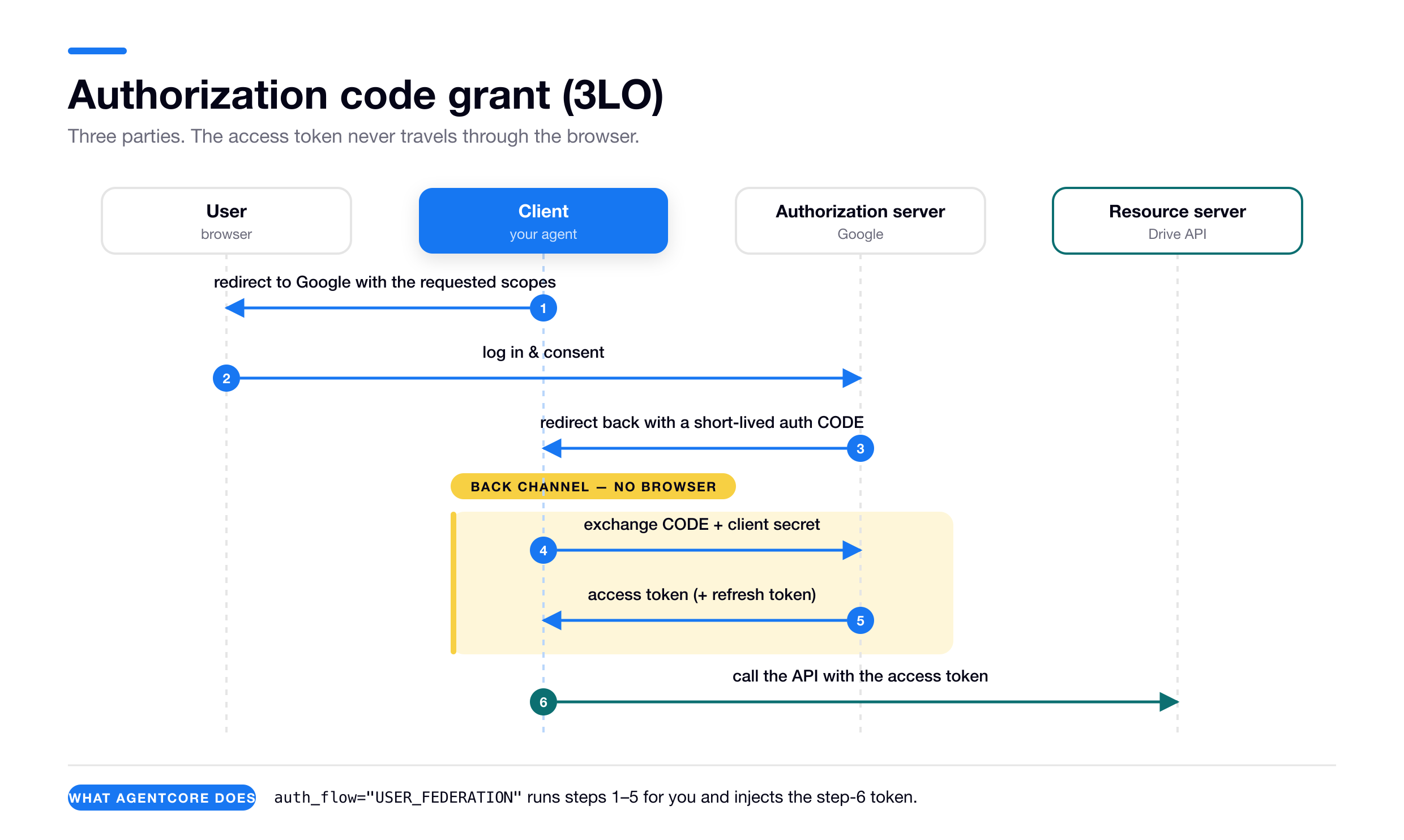
Why the two-step dance of getting a code and then exchanging it for a token? So the actual token never travels through the browser’s URL bar. Only a single-use code does, redeemed over a secure back channel.
AgentCore is the client here. @requires_access_token(auth_flow="USER_FEDERATION") runs steps 1 through 5 for you, stores the token in the Vault, and injects the step-6 token into your function. Each user consents separately and ends up with their own token.
Flow 2: client credentials, or “2LO” / “M2M”
Two-legged means two parties, the client and the authorization server. No user, no browser, no consent screen. The client authenticates as itself with its own client id and secret and gets a token representing the application. This is the flow for service-to-service and agent-to-agent calls.
- Client sends its
client_idandclient_secretto the token endpoint, asking for scopes. - Authorization server returns an access token representing the client itself, with no user identity inside.
- Client calls the resource server with that token.
@requires_access_token(auth_flow="M2M") does both of those for you and vaults the token agent-only. There’s no consent and nothing to bind to a user.
Flow 3: token exchange, or “OBO” (RFC 8693)
Use it when the client already holds a token for the user but the target won’t accept it, usually because the target wants a token for its own audience. Instead of re-prompting the user, the client trades the token it has for a new one.
- Client presents the token it holds, the subject token, optionally alongside its own actor token, with a token-exchange grant type.
- Authorization server validates them and returns a new access token minted for the requested audience, still carrying the user’s identity and often the agent’s as the acting party.
- Client calls the downstream resource server with the new token, which now passes the audience check.
In AgentCore the credential provider is configured with an onBehalfOfTokenExchangeConfig and you request it with oauth2Flow=ON_BEHALF_OF_TOKEN_EXCHANGE.
Two things that aren’t OAuth at all
JWT passthrough just forwards a token you already have, with no round-trip to an authorization server. IAM SigV4 is AWS request signing. Both are outbound mechanisms here, neither is an OAuth grant.
One thing the “pick a mechanism” framing hides: an agent that talks to several systems ends up with several mechanisms side by side. A passthrough tool here, an M2M-authenticated Gateway client there, an IAM-signed Gateway via mcp-proxy-for-aws, an OBO call to a tiered API, a 3LO tool for the user’s data. You’re not choosing one for the agent, you’re choosing one per connection, and the wiring is mechanical once you’ve picked.
Those three flows are the ones where AgentCore acts as your OAuth client. The comparison table in the reference section lines them up against each other, with the argument that triggers each one.
With the cast and the flows in hand, the rest is mostly picking which one the target forces on you.
The target picks the mechanism #
Your agent is the client. The external system it calls already has an authentication method of its own, and that system is the lock. AgentCore only cuts keys, and you don’t get to file down the lock to fit the key you’d prefer.
So the first question is never “which mechanism do I like?” It’s “what does this target expect?”
A Gateway configured for IAM inbound accepts only SigV4. Google’s Drive API accepts only a user-delegated OAuth token with the right scopes. A partner API that validates tokens for its audience rejects one minted for any other. An API-key service wants an API key and nothing else. Answer the target question and your options usually collapse to one.
There are four answers to “what does the target expect,” and they organise everything that follows:
- Nothing. The target is protected by the network, not by auth. AgentCore Identity doesn’t help.
- A static API key.
- A user’s access token. The call must act as a specific user.
- A machine (M2M) token. The call acts as the agent itself.
The first two involve no identity whatsoever: no user, no agent, no token negotiation, nothing to consent to. That’s why none of the OAuth vocabulary above applies to either of them.
Answers three and four are where the flows from the primer show up, and they share a setup shape that’s identical every time: configure the external IdP or OAuth server first, registering an app and getting client credentials. Then create the AgentCore credential provider. Then register the provider’s returned callback URL back on the IdP. (Walkthroughs: Google, Cognito.)
Easiest first.
Case 1: the target wants nothing #
Some downstream systems have no authentication at all. An internal service reachable only inside a VPC. A database open to a security group. A legacy endpoint fronted by nothing but a private subnet. The network boundary is the auth.
AgentCore Identity has nothing to offer here. It’s a networking problem, solved with networking primitives: VPC configuration, security groups, PrivateLink, VPC endpoints, and the egress settings of wherever your agent runs. On a Runtime that means the Runtime’s networking configuration reaching the target’s private network. Self-hosted, it’s your own host’s network placement.
Case 2: the target wants an API key #
Plenty of services authenticate with a single long-lived API key. Many weather, search, and data APIs, plus a lot of internal tooling.
AgentCore handles these with an API-key credential provider, a sibling of the OAuth credential provider. Two steps: store the key once, pull it at runtime.
Step 1: create the provider
Pass the key inline, from the CLI or the SDK.
# Control-plane API. Pass the key inline (simplest)
aws bedrock-agentcore-control create-api-key-credential-provider \
  --name "your-service-name" --api-key "your-api-key" --region us-east-1
# SDK, equivalent
from bedrock_agentcore.services.identity import IdentityClient
identity = IdentityClient("us-east-1")
identity.create_api_key_credential_provider({"name": "your-service-name", "apiKey": "your-api-key"})Either one returns the provider ARN plus the ARN of a Secrets Manager secret that AgentCore created to hold the key. That second ARN is worth reading closely, because it tells you where the key actually lives, and it raises a question this section comes back to.
{
  "name": "your-service-name",
  "credentialProviderArn": "arn:aws:bedrock-agentcore:us-east-1:<acct>:token-vault/default/apikeycredentialprovider/your-service-name",
  "apiKeySecretArn": { "secretArn": "arn:aws:secretsmanager:us-east-1:<acct>:secret:bedrock-agentcore-identity!default/apikey/your-service-name-…" },
  "apiKeySecretSource": "MANAGED"
}
"MANAGED" means AgentCore created and owns that secret. If you’d rather point at a secret you already manage, swap --api-key "…" for --api-key-secret-source EXTERNAL --api-key-secret-config secretId=<secret-arn>,jsonKey=<field>, and apiKeySecretSource reads EXTERNAL.
Source: Credential providers, creating an API key credential provider. Response shape verified against a live create-api-key-credential-provider call.
Step 2: use it at runtime
The easy path is the @requires_api_key decorator, which pulls the key from the Vault and injects it the same way @requires_access_token injects an OAuth token.
from bedrock_agentcore.identity.auth import requires_api_key

@requires_api_key(provider_name="your-service-name")
async def call_weather_api(*, api_key: str):
    # api_key is injected from the Token Vault. No user, no agent, no flow
    ...
Source: adapted from Obtain an API key.
Under the hood it’s the same two-hop machinery as every other outbound call, mint a workload access token then spend it, except the spend call is GetResourceApiKey instead of GetResourceOauth2Token and there’s no consent branch. The key is just sitting there.
Without the decorator you make both hops yourself, and the first one has a branch in it: the workload access token may already be sitting in your request headers.
If the Runtime injected one, read it and spend it. If it didn’t, mint one against a workload identity you created yourself. Off a Runtime there are no request headers at all, so the branch collapses and you always mint. That decision works the same way for every credential type, and the rule per credential type is spelled out later, but here is the whole handler:
import os
import boto3
from fastapi import FastAPI, Request

# Data-plane client. This is the one that mints and spends workload access tokens.
client = boto3.client("bedrock-agentcore", region_name="us-east-1")
app = FastAPI()

PROVIDER_NAME = "your-service-name"          # the credential provider from step 1

# A workload identity YOU created, for the case where nothing is injected. Once:
#   aws bedrock-agentcore-control create-workload-identity --name my-workload
STANDALONE_WI = os.getenv("STANDALONE_WORKLOAD_IDENTITY_NAME")

# The Runtime sends the same value under both names. Lookups are case-insensitive,
# but they are not hyphen-insensitive, so match these exact spellings.
WAT_HEADERS = ("workloadaccesstoken",
               "x-amzn-bedrock-agentcore-runtime-workload-accesstoken")

def read_injected_wat(headers) -> str | None:
    return next((headers[n] for n in WAT_HEADERS if headers.get(n)), None)


@app.post("/invocations")
async def invocations(request: Request):
    # HOP 1a: already injected? (JWT inbound, or IAM + User-Id.) Use it as-is.
    wat = read_injected_wat(request.headers)

    # HOP 1b: nothing injected (bare IAM SigV4, no User-Id). Mint an agent-only
    # token against YOUR identity. The Runtime's own identity is blocked from this.
    if wat is None:
        wat = client.get_workload_access_token(
            workloadName=STANDALONE_WI,
        )["workloadAccessToken"]

    # HOP 2: spend whichever token you ended up with.
    api_key = client.get_resource_api_key(
        resourceCredentialProviderName=PROVIDER_NAME,
        workloadIdentityToken=wat,
    )["apiKey"]
    ...
Nothing about identity is negotiated here. There’s no consent step and no refresh flow, and the user-versus-agent question doesn’t arise at all. What the Vault gives you is encrypted storage and scoping by workload identity.
”Why not just use Secrets Manager directly?”
As the create response showed, AgentCore puts the key in Secrets Manager for you as a managed secret.
What the provider adds is consistency. The secret sits behind the same Token Vault, is scoped by the same workload-identity and execution-role machinery, and is injected by the same decorator as your OAuth credentials. One mental model and one IAM story for every outbound secret instead of hand-rolling Secrets Manager access per service.
If you have exactly one API key and no OAuth anywhere, using Secrets Manager directly is defensible. Once you have both, the uniformity is worth it.
That argument rests entirely on the phrase “one IAM story”. That story has two permissions in it, and a locked-down role has neither.
Who’s actually allowed to read it: two permissions, not one #
Reading a credential out of the Vault is gated by ordinary IAM on whoever is calling: the Runtime’s execution role, or your local profile when you’re testing. It takes two permissions rather than one, and the second belongs to a different service entirely.
The first is bedrock-agentcore:GetResourceApiKey, which lets you call the retrieval API at all. Without it:
AccessDeniedException: ... not authorized to perform: bedrock-agentcore:GetResourceApiKey
on resource: ...:token-vault/default/apikeycredentialprovider/<name>
The second is secretsmanager:GetSecretValue, because the key physically lives in a Secrets Manager secret, and GetResourceApiKey reads that secret as your role rather than as a service principal. With the first permission in place but not this one:
AccessDeniedException: Access denied when retrieving secret
'arn:...:secret:bedrock-agentcore-identity!default/apikey/<name>-...':
... not authorized to perform: secretsmanager:GetSecretValue
Here is the least-privilege version, from AWS’s execution-role reference:
{ "Version": "2012-10-17", "Statement": [
  { "Sid": "GetApiKey", "Effect": "Allow", "Action": "bedrock-agentcore:GetResourceApiKey",
    "Resource": [
      "arn:aws:bedrock-agentcore:<region>:<acct>:token-vault/default",
      "arn:aws:bedrock-agentcore:<region>:<acct>:workload-identity-directory/default",
      "arn:aws:bedrock-agentcore:<region>:<acct>:token-vault/default/apikeycredentialprovider/<name>" ] },
  { "Sid": "ReadBackingSecret", "Effect": "Allow", "Action": "secretsmanager:GetSecretValue",
    "Resource": "arn:aws:secretsmanager:<region>:<acct>:secret:bedrock-agentcore-identity!default/apikey/<name>-*" }
] }
The trailing -* on the secret ARN matches the random suffix Secrets Manager appends to the name. The provider segment is worth a second look too: it’s apikeycredentialprovider/<name>, not the api-key/<name> that the scope-credential doc writes. The error message above, the create response, and the execution-role reference all use the long form. Get it wrong and the policy silently fails to match.
If you don’t need per-provider isolation yet, one broader pair covers everything in the default vault, and I verified it works: GetResourceApiKey and GetResourceOauth2Token on token-vault/default/*, plus secretsmanager:GetSecretValue on secret:bedrock-agentcore-identity!default/*.
None of this is specific to API keys, by the way. That’s just where you meet it first. GetResourceOauth2Token needs the same pair, on …/oauth2/<name>-* instead, and so does CompleteResourceTokenAuth when your callback endpoint runs it. Assume anything that pulls a credential out of the Vault needs both permissions.
Nothing binds an agent to a provider by default
Those policies scope by provider ARN, which makes it look as though AgentCore tracks which provider a given agent is entitled to. It doesn’t.
Any workload identity in your account can fetch any credential provider in that account, so long as the caller’s IAM allows it. AWS says so outright: the service “does not enforce additional binding between workload identities and credential providers in the same account.”
So the Resource blocks above aren’t tightening some restriction that already exists. They are the restriction, and without them a broad grant reads every provider you have.
If you want one agent limited to one provider, you write that yourself: separate workload identities, separate execution roles, and Resource scoped to specific provider ARNs. An explicit Deny on a provider ARN is the stronger version, since Deny always beats Allow. (Scope credential provider access)
That also answers a question the API-key case raises: what is the workload identity even doing here? With a 3LO token it picks which row comes back, because the Vault keys on (identity + user). An API key is stored once per provider, so there’s one row and nothing to pick. The call still won’t run without a workloadIdentityToken, but that token isn’t what narrows access here. Your execution role is: it’s the IAM principal, and the Resource blocks it’s scoped with name providers, not identities. In the API-key case the workload identity is a required parameter, not an access boundary.
Before moving on
Ask what the target expects before anything else, because that one question does most of your architecture for you: nothing, an API key, a user’s token, or a machine token. Where the answer is “nothing,” Identity has no part to play at all and you’re reaching for VPCs and security groups instead.
API keys are the easy case with a hard IAM story. The secretsmanager:GetSecretValue half stays invisible until a least-privilege role hits production, and the provider ARN segment is apikeycredentialprovider/<name>.
Test your understanding
- What are the four things a downstream target can expect, and which of them need no identity at all?
- When is your agent the OAuth client and when is it the resource server?
- Which two IAM permissions does reading a credential out of the Token Vault require?
- What binds a given agent to a given credential provider?
Case 3: the target wants a token that acts as a specific user #
Reading someone’s Google Drive. Posting to their Slack. Hitting an internal API as them rather than as your service.
The user’s identity has to reach the outbound call somehow. On a Runtime that means it arrived inbound, either as a verified JWT or via the User-Id header. Self-hosted, you assert it yourself.
One distinction decides most of this: do you own the target?
Sometimes the team that owns the agent also owns the downstream system, like an internal API behind your own IdP. Then you have latitude, because you control both ends: you can accept the user’s existing token, or configure a token exchange. Sometimes you don’t own it, as with Google Drive, Slack or a partner API. Then the target’s rules are fixed and you usually have to originate a fresh token through their OAuth flow.
Given a user identity, there are three mechanisms, and that ownership question is most of what picks between them.
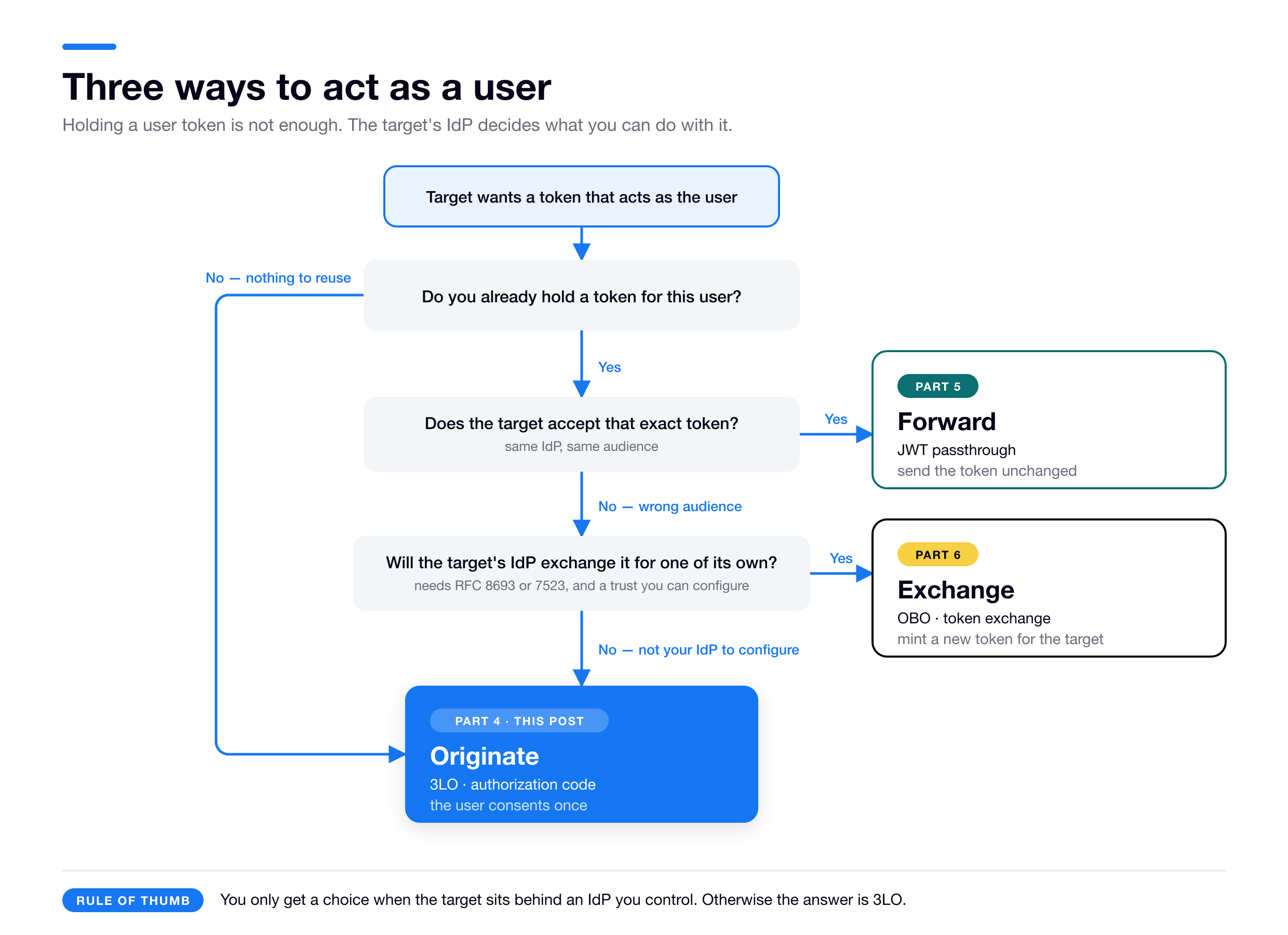
Originate is 3LO. Forward is passthrough. Exchange is OBO.
Session binding takes up most of the 3LO material below. It turns a half-hour demo into a half-day of work, it’s the reason a 3LO flow hangs forever with no error, and it exists to stop a real account-takeover attack. It’s also the one thing you can’t pick up by copying AWS’s sample callback server, which takes the user’s identity from a value you POST before the flow rather than from the browser that just consented. That’s fine for the single-user dev harness it is, and it’s the whole vulnerability if you carry the pattern into a multi-user app. Why, in detail, once the mechanism is on the table.
Originating a fresh token with 3LO #
Use this when you don’t hold a usable token for the target, which is almost always because you don’t own the target.
To reach a user’s Google Drive, their Slack, their calendar, you have to send them through Google’s or Slack’s own consent screen. Different users, different tokens, different data. No way around it. This is the OAuth authorization-code flow and auth_flow="USER_FEDERATION" is its name in AgentCore.
What this pattern quietly assumes
3LO is interactive. A real human has to open a browser and click “Allow.” That part is non-negotiable, because only a person signed in at Google can approve access to their own Google data.
What is negotiable is what kind of application drives that browser. The walkthrough below assumes one shape: a human user, at a browser, using a web app you build and control, which talks to your agent.
A CLI works too. A CLI opens the user’s browser and catches the post-consent redirect on a loopback address, which is exactly what aws sso login and gh auth login do, and what the legacy agentcore starter toolkit does locally. Loopback return URLs are accepted by AgentCore, which I tested.
The case that genuinely doesn’t fit is a fully headless one: a backend service or a scheduled job with no human present at the moment the credential is needed. Nobody is there to click, so you can’t run first-time consent inline. Pre-authorize instead, having the user consent once up front so a refreshable token is waiting in the Vault, after which the agent reads the cached token and never needs a browser again.
The cast
3LO has more moving parts than the other patterns, so they’re worth naming once.
| Who | What they are |
|---|---|
| The user (+ their browser) | The person whose Google data you want to reach. |
| Your app | The web front end the user logs into and clicks around in; it talks to your agent. |
| Your agent | Your code, running on a Runtime or self-hosted. |
| AgentCore Identity | AWS’s broker. It runs the OAuth dance and stores the result in the Token Vault. |
| The provider | Google, Slack, whoever owns the data and shows the consent screen. |
The happy path
Once a user is already connected, the entire agent side is one decorated function. @requires_access_token is a helper from the AgentCore Python SDK: it runs the auth flow, pulls the resulting credential from the Token Vault, and passes it into your function as the access_token keyword argument.
from bedrock_agentcore.identity.auth import requires_access_token

@requires_access_token(
    provider_name="google-provider",
    scopes=["https://www.googleapis.com/auth/drive.metadata.readonly"],
    auth_flow="USER_FEDERATION",        # 3-legged OAuth (authorization code)
    on_auth_url=lambda url: print("Visit to authorize:", url),
    force_authentication=False,         # cache the token after first consent
    callback_url="https://your-app.example.com/callback",  # YOUR session-binding endpoint (see below)
)
async def access_user_drive(*, access_token: str):
    # access_token is injected, scoped to THIS user
    ...
Source: adapted from the Google Drive 3LO tutorial.
That’s it. access_token arrives already scoped to the current user, so you build a Google client and go.
callback_url only matters the first time a user connects, when no token exists yet. That first connect is where all the complexity lives.
The first time a user connects #
- Your agent asks AgentCore for the user’s Google token.
- There isn’t one yet, so AgentCore hands back a consent URL instead of a token.
- You send the user’s browser to it. They sign in to Google and click Allow.
- Google sends the browser back through a short redirect chain, and AgentCore stores the resulting token in the Token Vault.
- Your agent, which has been waiting this whole time, receives the token and calls Google.
Two different URLs show up in steps 3 and 4, and the docs call both of them a “callback URL.” Name them apart and the rest falls into place.
| (a) The IdP redirect URL | (b) The session-binding endpoint | |
|---|---|---|
| Who hosts it | AWS/AgentCore. You don’t build or deploy anything | You (or the CLI, locally) |
| What it looks like | https://bedrock-agentcore.<region>.amazonaws.com/identities/oauth2/callback/… | https://your-app.example.com/callback |
| How you get it | Auto-generated. It’s the callbackUrl field in the create-oauth2-credential-provider response | You choose it, and the user’s browser has to be able to reach it. AWS documents it as a public HTTPS endpoint, though loopback is accepted in practice |
| Do you register it at Google? | Yes, and it’s the only URL Google ever needs. Paste it into Google’s “authorized redirect URIs” | No. Google never sees (b). You register it with AgentCore, on the agent’s workload identity, and pass it as the decorator’s callback_url |
Two different registrations in two different places. That’s the whole confusion. (a) is registered at Google. (b) is registered at AgentCore. They are never the same URL and you never give (b) to Google.
So the auto-generated URL you get back from creating the credential provider is (a). You host nothing, you just copy it into Google’s redirect-URI list. (provider callbackUrl)
But then how does (b) ever get called, if Google doesn’t know about it?
Because the post-consent redirect is a two-hop chain, and Google only needs to know the first hop.
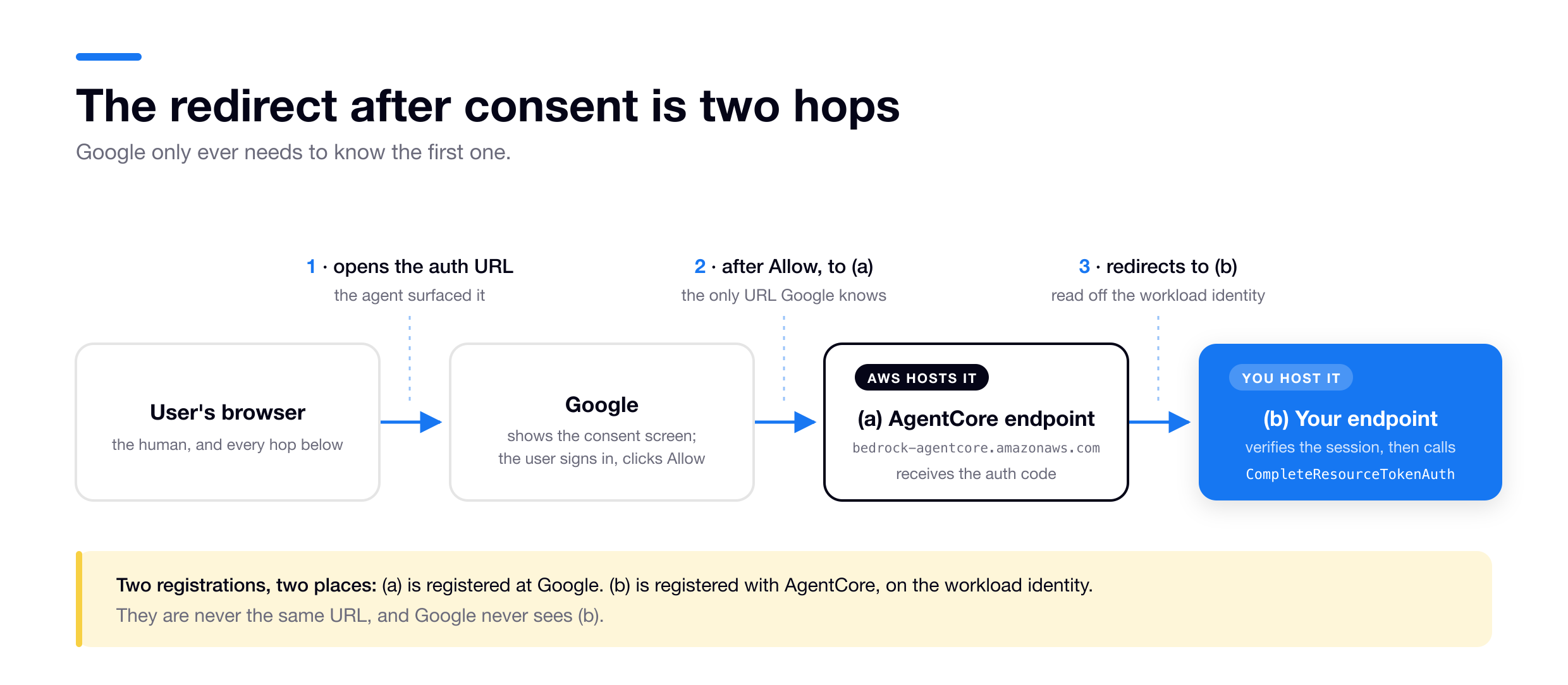
Google redirects the browser to (a), the AgentCore endpoint it was told about. AgentCore takes the authorization code, then redirects the browser onward to (b). It knows where (b) is because you registered (b) with AgentCore, on the workload identity. Not because Google did.
So who builds (b)?
In production you host (b) yourself no matter where the agent runs, and AgentCore does not provide it. Locally you don’t have to: the legacy agentcore starter toolkit hosts it for you, or you run AWS’s sample callback server. The details, and which tool actually does that, plus the order everything has to be created in, are a couple of sections down. What matters for now is that (b) is code you own, and the next section is why.
Session binding #
Session binding is a security check you can’t skip, and it’s the reason endpoint (b) has to be yours rather than something AWS hosts for you.
What goes wrong without it
Think of the authorization URL as a coupon that says “file the token this produces in this agent + user slot.”
Concretely it’s the authorizationUrl that GetResourceOauth2Token hands back instead of a token on a first connect. AgentCore assembles it rather than hosting it: the client id and scopes come from your credential provider, the redirect points at the AWS-hosted (a) endpoint, and the page the user actually lands on is Google’s. Alongside it comes a sessionUri, and that’s where the binding really lives. The URL is just what carries it to a browser.
AgentCore knows who the coupon is for because you told it. The workloadIdentityToken you spent on that call is a workload access token, and it encodes workload identity plus user. AgentCore reads that pair off it and ties the new session to it, and from that point on the pair is “the originating user” that CompleteResourceTokenAuth will later insist you match. Nothing about the user is inferred from the browser, then or ever, which is the root of everything below.
Mallory kicks off a 3LO flow as himself, gets the authorization URL, and sends it to Alice: “please authorize our assistant.” Alice opens it, signs in to her Google, and clicks Allow. The token AgentCore harvests is Alice’s Google token. But the flow was started by Mallory, so without session binding it gets filed under Mallory’s agent + user slot.
Mallory’s agent can now read Alice’s Drive.
Nothing on Alice’s consent screen looked wrong. She really was authorizing access to her own account. She just had no idea the grant was being bound to someone else’s session.
This is the OAuth cousin of session fixation, and it’s why a coupon can’t be allowed to self-redeem. Something has to confirm that the person clicking Allow is the same person the coupon was issued to.
How the check works
Session binding is that confirmation.
- When your agent starts the flow it’s acting for a specific user, the identity (inbound JWT or
user_id) that minted its workload access token. AgentCore ties that to a unique session URI. - After consent, AgentCore redirects the browser to (b), carrying the session URI and information identifying the originating user.
- Endpoint (b) is a route in your own web app, so it already knows who is currently logged in, from the live browser session. That means the session cookie your app set when this person logged in. (A session cookie is the small token a website drops in your browser at login so it recognizes you on later requests. If you’ve never built a web app, that’s the one piece of background to take on faith.) The docs are explicit that this identity must come from the active browser session, not a shared or remote cache.
- Your code compares the two. Is the person finishing consent in this browser the same user the flow was started for? Only if they match do you call
CompleteResourceTokenAuth(sessionUri, userIdentifier), whereuserIdentifieris that same original identity, bound to the session URI.
Back to the attack. Alice’s browser is logged into your app as Alice, but the flow’s originating user is Mallory, so step 4’s comparison fails, you call nothing, and Alice’s token never lands in Mallory’s slot. More generally, a forwarded URL opened in someone else’s browser carries a different app session, or none at all, so step 4 fails and nothing is released.
And until CompleteResourceTokenAuth lands, AgentCore holds the token back and the pending token call just hangs. That’s the silent stall, and now you know what it means.
Who enforces what
It’s easy to lose track of which half is yours, so here it is exactly. CompleteResourceTokenAuth rejects a userIdentifier that doesn’t match the session’s originating user. I tested it; the enforcement is real and it is server-side. What AWS cannot do is judge whether the identifier you handed it has anything to do with the person in the browser.
That’s the whole game, and it turns on where your callback gets the identifier from, not on the comparison you write around it.
Derive it from the live browser session and the API’s check does the work for you. Alice’s browser carries her cookie to (b), you pass Alice, the session originated with Mallory, the identifiers disagree, and AWS refuses. Alice’s token never reaches Mallory’s slot.
Derive it from your own records instead and you’ve disarmed the check. Look the session URI up in a pending-flow ledger, find started_by = mallory, pass that, and you have handed the API back the very value it’s comparing against. It matches by construction. The API is satisfied, Alice’s Google token lands in Mallory’s slot, and nothing anywhere logged a problem. That is precisely what AWS’s sample callback server does, which is why it isn’t a security template.
It’s worth seeing, because it doesn’t look like a bug. Here is the same callback as the recipe below, written by someone who read the constraint and took it at face value:
# THE BROKEN CALLBACK. Reads sensibly, passes every check AWS makes.
@app.get("/callback")
def oauth_callback(request):
    session_uri = request.query_params["session_id"]

    # "The API demands the identity that STARTED this flow, not whoever's in the
    #  browser. I wrote that down when I kicked it off, so I'll read it back."
    # pending_auth: a short-TTL store of your own, written when the flow began.
    started_by = pending_auth.get(session_uri)

    client.complete_resource_token_auth(
        sessionUri=session_uri,
        userIdentifier={"userId": started_by},   # <-- sourced from YOUR records
    )
    return "Connected."
The reasoning in that comment is correct. You really must complete with the originating identity, and reading it back out of your own ledger really does satisfy that. The requirement is met. The check is dead.
Walk Alice through it. Mallory is the one who started the flow, so when his agent made the GetResourceOauth2Token call that produced this session URI, it recorded session_uri → "mallory". Alice’s browser arrives at /callback carrying that session URI and, on the very same request, Alice’s cookie for your app. The handler reads the session URI off the query string, then reads "mallory" straight back out of that store. AWS compares "mallory" against the originator, "mallory", and agrees. Alice’s Google token is vaulted under Mallory. Her cookie sat on that request the whole time and no line of code ever looked at it.
Now compare it to the working version below. It differs by one if and one variable.
That difference is invisible in normal use. When the person consenting is the person who started the flow, current.id and started_by are the same string, so both callbacks send AWS exactly the same request and both work. The broken one only behaves differently once two different people are involved. So it passes code review, and it passes a test run where you are the only user, and it fails the first time someone actually attacks it.
So the security boundary is the sourcing. Worth being concrete about how (b) can source it at all, because it isn’t obvious: the last hop is a redirect, not a server-to-server call from Google. It’s Alice’s browser that navigates to https://your-app.example.com/callback?session_id=…. An ordinary request to your own domain, so the browser attaches your app’s cookies and the handler reads its own session. The identity never comes from Google. It comes from the fact that the browser making the request is the browser you logged in earlier. That’s why (b) has to be a route in your app rather than something AWS hosts, and why the docs specify the live browser session rather than a lookup.
Write the explicit current == started_by comparison anyway. Not because AWS skips it, but because it fails fast with a clean 403 instead of an opaque AccessDenied from deep inside the call, and because it forces you to decide what happens when there is no app session in that browser. The tempting answer there is to fall back to the ledger, and the fallback is the vulnerability.
What about a CLI, where there are no cookies?
Some of it doesn’t change. 3LO’s consent is always a browser step, since only a human in a browser can approve at Google, and something still has to catch the post-consent redirect and call CompleteResourceTokenAuth. What changes is that the cookie-based check in the recipe is a web-app construct, and a CLI has no cookies.
But a CLI is single-user, the person at the terminal, so the multi-user hijack that session binding defends against largely evaporates. “Current equals originator” is trivially true. The CLI equivalent is a loopback server plus a state nonce, exactly how aws sso login and gh auth login work. The CLI generates a random state, opens the auth URL, starts a throwaway server on http://localhost:<port>, checks state on the redirect as CSRF protection (the stand-in for the cookie check), then calls CompleteResourceTokenAuth. AgentCore accepts that loopback URL, tested, including from a deployed Runtime, so this isn’t a local-only trick. The legacy agentcore starter toolkit already does it for you.
Why does that work without a cookie when the web app needs one? The cookie was never the goal. Proving the finisher is the starter is the goal, and each context proves it differently. The forwarding attack needs the victim’s completed consent to land where the attacker’s pending flow lives. With a CLI that’s http://localhost, reachable only from the attacker’s own machine, so a link opened on someone else’s machine redirects to their localhost and the attacker’s flow never completes. The loopback boundary does what the cookie does. A web app can’t lean on that, because its callback is a public URL shared by every user (it has to be, to serve them all on any machine), so a forwarded completion lands at that same shared server and the cookie becomes the only way to tell whose browser it is. The CLI gets that boundary from the network for free. A web app has to build it out of the session.
For a headless Runtime-hosted agent the cleanest path is to pre-authorize once. Have the user consent a single time up front so a refreshable token is vaulted, after which the agent reads the cached token and never needs a browser. A caveat I had wrong until I tested it: AWS documents AllowedResourceOauth2ReturnUrl as a public HTTPS endpoint, but loopback is in fact accepted, including on a deployed Runtime’s service-managed identity. The tested rule is below.
A recipe you can copy #
The whole idea in one sentence: your app already knows who’s logged in, and session binding says don’t finalize a user’s Google connection unless the person in the browser right now is signed in as that same user.
Same instinct as a “link your bank account” button that refuses to run unless you are the one logged in and clicking it.
One constraint makes it more than a vibe. At the callback you must call complete_resource_token_auth with the identity that started the flow. That’s the identity the session URI is tied to, the one that minted the workload access token. You can’t substitute whoever happens to be in the browser.
So you need two things. Know who started this particular flow, and confirm that’s who’s logged in now. A short-lived ledger in your own store does both, and it’s framework-agnostic.
# STEP 1: when you kick off 3LO for the currently-logged-in user.
#
# From AWS: just boto3. There is no special client for any of this.
import boto3
client = boto3.client("bedrock-agentcore", region_name="us-east-1")
#
# Yours to supply, because they're specific to your app and framework:
#   request       the inbound HTTP request object (Flask, FastAPI, Django, whatever)
#   current_user  the user your app already authenticated for this request
#   pending_auth  a short-TTL key-value store you own: DynamoDB, Redis, Postgres.
#                 Needs put(key, value, ttl) / get(key) / delete(key).
#   send_user_to  however your framework issues a browser redirect

# The Runtime sends the same value under both names. Lookups are case-insensitive,
# but they are not hyphen-insensitive, so match these exact spellings.
WAT_HEADERS = ("workloadaccesstoken",
               "x-amzn-bedrock-agentcore-runtime-workload-accesstoken")

def read_injected_wat(headers) -> str | None:
    return next((headers[n] for n in WAT_HEADERS if headers.get(n)), None)

# Where `wat` comes from: READ the token the Runtime injected. Do not mint one here.
# 3LO files the result under (agent + user), so the token has to name a user, and an
# agent-only token you minted yourself names none. No injected token means no user
# reached your agent, which is an inbound problem. See the note under this snippet.
wat = read_injected_wat(request.headers)
if wat is None:
    return "No user identity on this request.", 401

# The raw call hands you the sessionUri; stash which user it belongs to.
resp = client.get_resource_oauth2_token(
    resourceCredentialProviderName="google-provider",
    scopes=["https://www.googleapis.com/auth/drive.metadata.readonly"],
    oauth2Flow="USER_FEDERATION", workloadIdentityToken=wat,
    resourceOauth2ReturnUrl="https://your-app.example.com/callback",  # endpoint (b)
)
if "authorizationUrl" in resp:                     # first-time consent needed
    pending_auth.put(resp["sessionUri"], current_user.id, ttl_seconds=600)  # your DB / Redis
    send_user_to(resp["authorizationUrl"])         # redirect the browser to consent
# STEP 2: the callback (endpoint b), a route in YOUR web app. AgentCore sends the
# browser here after consent (register this URL on the workload identity as an
# AllowedResourceOauth2ReturnUrl).
#
# `pending_auth` is the same short-TTL store as step 1. `app` is your web framework's
# app object, and the route decorator here is FastAPI-flavoured; use whatever yours is.
# current_user_from_browser_session() is yours to write: it reads your session
# cookie and returns the logged-in user, or None. That function IS the security
# check, so it has to read the live session and not a cache.
import boto3
client = boto3.client("bedrock-agentcore", region_name="us-east-1")
@app.get("/callback")
def oauth_callback(request):
session_uri = request.query_params["session_id"] # the flow's session URI
current = current_user_from_browser_session(request) # who's logged in NOW
started_by = pending_auth.get(session_uri) # who kicked THIS flow off (from step 1)
# THE session-binding check, in one line:
if current is None or started_by is None or current.id != started_by:
return "Session mismatch, not authorizing.", 403 # do nothing; token stays locked
client.complete_resource_token_auth(
sessionUri=session_uri,
# Must match HOW the workload access token was minted (see rule below):
# JWT inbound -> {"userToken": "<the inbound JWT>"}
# IAM + User-Id -> {"userId": "<the user id>"}
userIdentifier={"userId": current.id},
)
pending_auth.delete(session_uri) # one-time use
return "Connected. You can return to your assistant."Two things that will cost you an afternoon in step 1. resourceOauth2ReturnUrl must match the URL registered on the workload identity exactly, trailing slash included, or AgentCore won’t redirect to it. And the token you pass as workloadIdentityToken must be the injected, user-bound one: minting an agent-only token here is the one substitution that looks like it works and then files the grant under no user at all. The read-or-mint rule covers every credential type.
Source: sessionUri and userIdentifier are the wire names, and this dict form is the one I tested. AWS’s session-binding page shows the same call through the Python SDK instead, where the arguments are snake_case and the identifier is a typed object rather than a dict, complete_resource_token_auth(session_uri=…, user_identifier=UserIdIdentifier(user_id=…)), with UserTokenIdentifier in the same module. Either form works, so pick one and be consistent. The session_id query-param name follows AWS’s sample callback server, and I confirmed AgentCore appends it to the redirect.
Which identifier to complete with is not a free choice
CompleteResourceTokenAuth validates the identifier against how the workload access token was minted, and the two inbound styles mint it differently. I tested both combinations.
| Inbound to your agent | AgentCore minted the WAT via | Complete with |
|---|---|---|
| JWT authorizer | GetWorkloadAccessTokenForJWT(userToken=<JWT>) | {"userToken": "<the inbound JWT>"} |
| IAM SigV4 + User-Id | GetWorkloadAccessTokenForUserId(userId=<id>) | {"userId": "<the user id>"} |
Get it wrong and the call fails with a generic AccessDeniedException: Invalid or expired session.
This lines up with the docs’ wording, “the original inbound identity provider OAuth token or user_id String that was used to generate the workload access token”. The sub is low-secrecy, it’s in every token and every log. Requiring the actual token means the completer must possess the inbound credential, not merely know an id.
That’s the entire mechanism. A valid session, and the logged-in user equals the user who started the flow. Run the Mallory attack through it and started_by is "mallory" while current.id is "alice", so the comparison fails and you 403 without releasing anything. Forward the link to a stranger instead and the first clause catches it: no session with your app means current_user_from_browser_session(...) returns None.
So the whole scheme rests on one thing: your callback must actually read your real login session. You never authenticate the stranger’s Google identity. You only ever check your own app’s session.
Don’t copy AWS’s sample server for this check
Its oauth2_callback_server.py is a single-user dev harness, not a security template. You POST a user identifier to a /userIdentifier/token route before the flow, it stashes that in memory, and its callback passes it straight through with complete_resource_token_auth(session_uri=session_id, user_identifier=self.user_token_identifier). No comparison against a logged-in browser session anywhere.
That stashed value is the originator, so the harness hands CompleteResourceTokenAuth the very identity the API is about to compare against. The check passes by construction, whoever is actually sitting in the browser.
Fine for one local user, where the two are always the same person. Copied into a multi-user app it reopens the exact Mallory/Alice hole above: Alice consents, Mallory’s identifier completes the flow, and Alice’s token lands in Mallory’s slot with nothing logged. Use it to see how the call is wired, never as the security model.
One caveat about the session URI
Don’t try to decode it. The sessionUri is an opaque URN (urn:ietf:params:oauth:request_uri:...), not a JWT, so there’s no user claim to read off it. That’s exactly why the recipe keeps its own short-TTL ledger of who started which flow.
Your current == started_by comparison is still worth writing even though the API enforces its own half, because it fails fast with a clean 403 instead of an opaque AccessDenied.
What to remember about 3LO
The two callback URLs have separate owners and separate registrations. (a) is AgentCore-hosted and goes in Google’s redirect-URI list; (b) is yours and goes on the workload identity. If your 3LO flow hangs after the user clicks Allow, look here first.
Session binding is a shared job, and the half that’s yours is the one that’s easy to get wrong. AWS enforces that the userIdentifier you submit matches the user who started the flow. You supply that identifier, and it has to come from the live login session in the browser that just consented. Read it from your own pending-flow records instead and the enforcement is satisfied by construction and protects nobody.
Match the identifier to the mint. JWT inbound completes with userToken, IAM plus User-Id completes with userId.
Budget for it. Stand up endpoint (b) first, before you write the agent. And nothing suspends while a user consents, so at any scale you want them pre-authorized out of band, with the tool hitting a cached token.
Who actually hosts endpoint (b) #
You do. AgentCore generates and hosts (a). It never hosts (b), on Runtime or self-hosted, and there is no setting that makes it. Endpoint (b) is code you write, deploy and own.
It needn’t be a dedicated service. A single route in the web app that already fronts your agent is enough, and because (b) is never in the token’s path it can equally be a Lambda, a container, or a process in an unrelated app. Register it on the workload identity:
aws bedrock-agentcore-control update-workload-identity \
  --name <your-workload-identity> \
  --allowed-resource-oauth2-return-urls https://your-app.example.com/callback
What URLs are allowed
A public HTTPS endpoint, or loopback on any scheme. Nothing else.
AWS documents the field as “a publicly available HTTPS application endpoint” and says nothing about loopback, so I assumed http://localhost was a local-dev indulgence that would stop working once deployed. It isn’t. Loopback is accepted everywhere, including on a deployed Runtime’s service-managed identity, confirmed end to end from the receiving server’s own log. What the validator actually implements is RFC 8252’s loopback exception.
Accepted — https://example.com:8443/callback, and on the three loopback hosts localhost, 127.0.0.1, [::1] any scheme at all: http://localhost/callback (port optional), http://127.0.0.1:8080/callback, https://localhost:8443/callback, even ftp://localhost:8080/callback.
Rejected, ValidationException / HTTP 400 — http://example.com/callback (plain HTTP off-loopback), myapp://callback, http://app.localhost:8080/callback, http://127.0.0.2:8080/callback, https://192.168.1.50:8443/callback, https://10.0.0.5/callback, https://169.254.169.254/callback.
Undocumented, not guaranteed. Tested 2026-09-22 in us-east-1. AWS’s devguide says this endpoint must be publicly available over HTTPS, and separately that Runtime requires a publicly accessible HTTPS callback. The service enforces neither. This is what it does, not what it promises, and behaviour that contradicts the docs is the kind that changes without notice.
Why loopback isn’t the security hole it looks like
Allowing plain http anywhere in an OAuth flow reads like a mistake, because the thing being redirected is worth stealing: the session URI that completes the flow. Over plain HTTP to a public host that value crosses the internet in cleartext, which is exactly why the validator rejects it.
A loopback address never crosses anything. The browser hands the request to a process on the same machine over the loopback interface, and no packet reaches a network. TLS there would be encrypting a conversation that has no eavesdropper available to it. The exception isn’t a relaxation of the rule, it’s the recognition that the threat the rule exists to stop doesn’t apply on that path.
What does remain is a hostile process on the same machine claiming the port first. RFC 8252’s answer is the state nonce, which the CLI pattern above already carries, and AgentCore adds its own: a completion whose userIdentifier doesn’t match the flow’s originator is refused outright.
The reason it still can’t serve a web app has nothing to do with safety. Your users’ localhost is their machine, not your server, so a loopback callback is unreachable from any browser but the one on the host running the receiver. That’s fine for a CLI, where the browser and the receiver are the same machine by construction. It’s useless for a server that has to serve everybody. Public HTTPS in production is an architectural requirement, not a validation one.
The local-dev shortcuts
Two AWS-supplied receivers save you writing one while developing. Neither is a production component, and neither performs the session-binding check.
- The legacy Python
bedrock-agentcore-starter-toolkithosts (b) for you and registershttp://localhost:8081/oauth2/callbackitself viaUpdateWorkloadIdentity— incidentally proving AWS’s own tooling relies on the loopback allowance. The npm@aws/agentcorethat replaced it has no OAuth receiver at all (checked at 0.24.1), so ifagentcore devisn’t catching your redirect, that’s why. oauth2_callback_server.py, a short FastAPI script you run onlocalhost:9090yourself, registering the URL yourself. AWS’s docs link a path that now 404s; that’s the current one.
The awkward part
On AgentCore Runtime, the registration step is genuinely backwards.
The Runtime creates its own workload identity for you, service-managed, named after the runtime id, and that identity doesn’t exist until after the runtime is deployed. So you can’t declare the return URL up front alongside the runtime. It isn’t a property of the runtime resource, and it isn’t part of the execution IAM role either. It’s data on the identity.
The order of operations ends up being: deploy the runtime, look up the identity it created, then call update-workload-identity on that identity to add your callback URL. Create a resource, go find what it auto-created, patch that, all to wire up something you knew from the start.
But that is what AWS documents. The session-binding guide says register the return URL with CreateWorkloadIdentity or UpdateWorkloadIdentity, and notes that “for workload identities created on your behalf by AgentCore Runtime or Gateway, the workload identity name will correspond to the runtime ID”, meaning update the service-managed one. You could instead create your own workload identity with the return URL baked in and mint tokens against it explicitly, but that trades the managed decorator path for the raw one and isn’t the documented Runtime flow.
The full order of operations
That backwards step isn’t the only one. Standing a 3LO setup up from nothing has two circular dependencies, and the first one sends you back to your IdP a second time. Here is the whole sequence.
- At the IdP, create the OAuth client. You want the client id and client secret. You can’t fill in the redirect URI yet, because the value doesn’t exist — leave it empty or park a placeholder there.
- Create the AgentCore credential provider with that client id and secret. The response hands back
callbackUrl, which is (a). AgentCore also writes the client secret into Secrets Manager at this point; keep the secret’s ARN, because two IAM roles will need it. - Back to the IdP, and add (a) to the authorized redirect URIs. This is the hop people skip, because nothing prompts you to return: the value you need only came into existence in step 2.
- Deploy endpoint (b). Its role needs
bedrock-agentcore:CompleteResourceTokenAuthandsecretsmanager:GetSecretValueon the step 2 secret. - Deploy the Runtime. This is the act that creates the service-managed workload identity, named after the runtime id. Its execution role needs
GetResourceOauth2Tokenand the same Secrets Manager grant. - Update that workload identity with (b)‘s URL.
Steps 4 and 5 don’t depend on each other and can run in parallel. Everything else is strictly ordered. The two loops are 1 → 2 → 3, where the IdP needs a value only AgentCore can mint, and 5 → 6, where the identity you must configure is created by the thing you just deployed.
If you’re doing this in IaC
Both loops are exactly what declarative infrastructure handles badly, and they break differently.
Step 3 lands outside AWS, after an AWS resource exists. If your IdP has a decent Terraform provider — Auth0 and Okta do — you can express it as a resource with a dependency edge and it’s merely ugly. If it doesn’t, you have a manual console step wedged into the middle of an otherwise automated pipeline, and the honest move is to make it an explicit gate rather than pretend it isn’t there.
Step 6 is the more interesting one, because you can design it away. The reason it can’t sit beside the Runtime is that the identity is created by the Runtime. Create your own workload identity instead and that inversion disappears: CreateWorkloadIdentity accepts allowedResourceOauth2ReturnUrls at creation, so the identity and its return URL become one ordinary declarative resource that the Runtime then references, rather than something you patch afterwards.
This is the case where I’d reach for a bring-your-own workload identity by default. Everywhere else in this guide, BYO identity is an escape hatch for when the Runtime injects nothing. Here it’s a design choice that turns a post-deploy patch into a declaration. The price is the one named above: you mint against it explicitly, which means the raw API path rather than the decorator path.
I’ve verified the API takes return URLs at creation. Whether AWS::BedrockAgentCore::WorkloadIdentity exposes them as a CloudFormation property I haven’t tested, so confirm that before building a stack around it.
What that leaves is a four-way split, cut along change frequency and along what crosses a trust boundary.
- Provider. The IdP OAuth client and the AgentCore credential provider. Depends on nothing else, and changes only when you rotate credentials.
- Callback. Endpoint (b) and its IAM role. Needs the secret ARN from the provider stack.
- Agent. The Runtime, its execution role, and the workload identity if you own it. Needs the secret ARN from the provider stack, and (b)‘s URL. This is the one that changes on every deploy.
- Wiring. The
update-workload-identitycall. Needs the callback and agent stacks to exist first, and changes only when (b) moves.
The split is doing three specific jobs. Stack 3 changes on every agent deploy, and you don’t want a routine deploy to be able to touch the credential provider, so the provider goes in a stack that changes on rotation and nothing else. The client secret enters the system only at stack 1, which keeps it out of the state file the agent team runs plans against daily. And stack 4 exists only because of the step 6 inversion — take the BYO identity route and it folds into stack 3, leaving three stacks and no post-deploy patching.
How the token actually reaches your agent, given that (b) never touches it, is below.
Endpoint (b) needs its own IAM, including a Secrets Manager grant
Because (b) is a separate process, its execution role is what calls CompleteResourceTokenAuth, not the agent’s. That role needs bedrock-agentcore:CompleteResourceTokenAuth and secretsmanager:GetSecretValue on the provider’s backing secret (secret:bedrock-agentcore-identity!default/oauth2/…).
The second is easy to miss. CompleteResourceTokenAuth is what actually exchanges the auth code with the IdP, so it reads the provider’s client secret from Secrets Manager as (b)‘s role. Omit it and you get AccessDeniedException: Access denied when retrieving secret …, and it lands after the session validates, so it looks like a 3LO bug rather than a missing grant.
Same “the API reads the secret as your role” pattern as every other Vault read.
What your tool is doing while the user consents #
When the agent calls a tool decorated with @requires_access_token, execution enters the decorator’s wrapper before your function body runs. The wrapper asks AgentCore for the token. On first consent there’s none, so it gets back an authorizationUrl, hands it to on_auth_url, and then appears to pause.
It starts a polling loop. There’s no magic suspend, no checkpoint and no continuation. The loop itself is the TokenPoller in services/identity.py; the decorator just accepts one through its token_poller argument (identity/auth.py).
# what the poller does, conceptually
while True:
    resp = get_resource_oauth2_token(... same request ...)   # ask AgentCore again
    if resp.get("accessToken"):
        return resp["accessToken"]        # got it, let the function body run
    time.sleep(poll_interval)             # wait a couple seconds...
    if elapsed > timeout:
        raise TimeoutError                # ...or give up
So the call stack is parked in a live loop the whole time.
agent's turn
└─ calls tool: access_user_drive(...)
   └─ @requires_access_token wrapper      ← execution is sitting in this loop
      └─ polls GetResourceOauth2Token every few seconds
   (your function body has NOT started yet)
The process is alive and busy, re-polling. From the model’s point of view the tool call simply hasn’t returned yet.
And CompleteResourceTokenAuth, called by endpoint (b), doesn’t resume anything directly. It writes the token to the Vault, and the loop’s next iteration finds it there and returns it. Two separate processes, synchronized only through the Vault.
That has consequences worth designing around.
A human is in your invocation’s critical path. The tool call stays open while someone clicks through consent, which on a Runtime counts against the max invocation duration, and the poll has its own timeout on top. The clean fix is to pre-authorize users out of band, so the tool finds a cached token and never pauses.
It only pauses on first consent. With force_authentication=False, once a user has consented the token is cached and auto-refreshed, so later calls never pause. The stall is a first-consent or post-revocation event, not an every-call tax.
The raw API lets you avoid blocking entirely. Since you own the poll, you can return the authorizationUrl to your caller, end the invocation, and re-drive the tool once consent is done. Interrupt and resume instead of a long synchronous wait.
The same flow without the decorator #
The agent side by hand. You mint the workload access token and call get_resource_oauth2_token yourself, handling the authorizationUrl re-poll branch.
import boto3
client = boto3.client("bedrock-agentcore", region_name="us-east-1")
# `request` is your inbound HTTP request object. Nothing else here is AgentCore-specific.

WAT_HEADERS = ("workloadaccesstoken",
               "x-amzn-bedrock-agentcore-runtime-workload-accesstoken")

def read_injected_wat(headers) -> str | None:
    return next((headers[n] for n in WAT_HEADERS if headers.get(n)), None)

# 3LO needs a USER-bound token, so read the one the Runtime injected. Don't mint:
# an agent-only token names no user, and there'd be no (agent + user) Vault entry.
wat = read_injected_wat(request.headers)
if wat is None:
    raise RuntimeError("no workload access token on the request")

req = {
    "resourceCredentialProviderName": "google-provider",
    "scopes": ["https://www.googleapis.com/auth/drive.metadata.readonly"],
    "oauth2Flow": "USER_FEDERATION",
    "workloadIdentityToken": wat,
    "resourceOauth2ReturnUrl": "https://your-app.example.com/callback",  # endpoint (b)
    # "customState": "...",        # echoed to (b) as ?state=
    # "forceAuthentication": True, # ignore any cached token, re-consent
}
resp = client.get_resource_oauth2_token(**req)

if "accessToken" not in resp:          # first consent: URL instead of a token
    print("Authorize here:", resp["authorizationUrl"])   # the decorator's on_auth_url
    # ...user consents, endpoint (b) calls CompleteResourceTokenAuth...
    poll_req = {**req, "sessionUri": resp["sessionUri"], "forceAuthentication": False}
    resp = client.get_resource_oauth2_token(**poll_req)  # repeat until accessToken appears

provider_token = resp["accessToken"]
A few details in there that the diagrams gloss over. The poll must echo sessionUri and set forceAuthentication back to False, or you restart the consent you’re waiting on. customState is an opaque string AgentCore hands to endpoint (b) as ?state=, which is how (b) learns which identifier to complete with. And resourceOauth2ReturnUrl has to match the registered return URL character for character, trailing slash included.
Where wat comes from, and what to do when it’s absent, is the read-or-mint rule.
The decorator and the Runtime each automate a different slice, and neither hosts (b).
The Runtime’s contribution is exactly one thing: it mints the workload access token and injects it into your request. The decorator’s is two: it hands you the consent URL through on_auth_url, and it polls until the token lands. Drop to the raw API and you do both of those yourself — read the URL off the GetResourceOauth2Token response, then re-call it echoing sessionUri until an accessToken comes back.
Endpoint (b) and the session-binding check appear in neither list. In production they are yours, decorator or not, Runtime or self-hosted. The only time anything else hosts (b) is local dev, where the legacy starter toolkit or the sample server stands in for you.
The same 3LO flow both ways. Left is the decorator, right is the exact API sequence it hides, with every @requires_access_token argument mapped (←) onto the internal parameter it becomes. I checked this against IdentityClient.get_token in services/identity.py and reproduced it end to end in both forms.
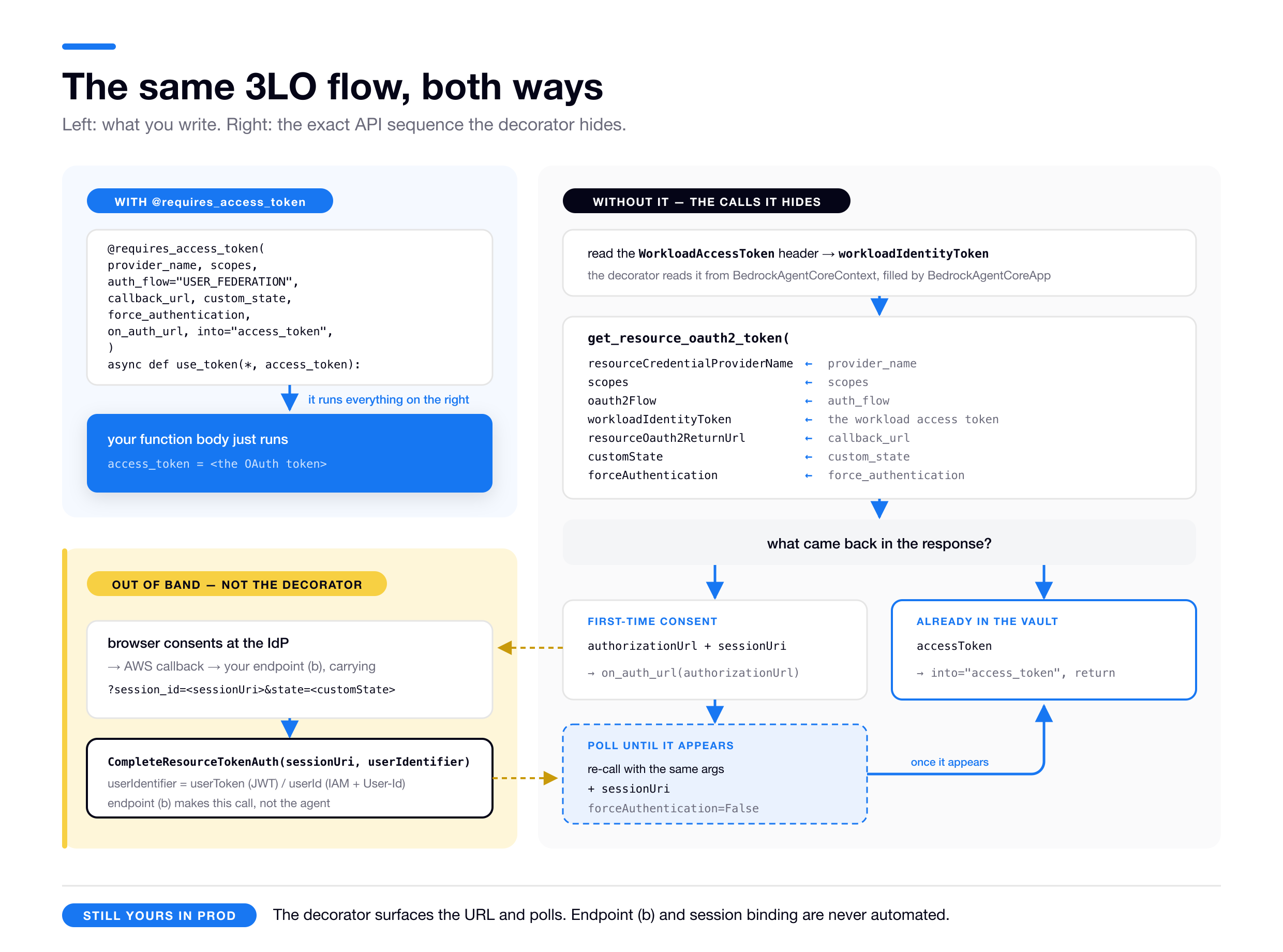
A note on two of the labels there. custom_state becomes customState and is echoed to endpoint (b) as state, which is the channel that carries identity to the callback. And the userIdentifier in CompleteResourceTokenAuth is dictated by inbound type, userToken for JWT and userId for IAM plus User-Id, and it’s a call endpoint (b) makes, not the agent.
Downstream sees the end user, so user-delegated access, and the provider access token is vaulted per agent + user.
Forwarding a token you already hold: JWT passthrough #
This one is much simpler. Use passthrough when you already have a user token and the target accepts that exact token, same IdP and same audience. Common when you own the target: your agent and the downstream service both sit behind your own Auth0 or Cognito tenant, so the token the user presented to your agent is equally valid downstream.
The agent forwards the user’s inbound JWT unchanged, so there’s no new token, no credential provider, no Vault entry and no consent step. AWS documents this as “Propagate a JWT token”, and at the Gateway it’s the JWT_PASSTHROUGH outbound type.
Two moving parts: allow the header in at deploy time, then read it and attach it to the outbound call.
Allow the Authorization header through
It is not forwarded to your container by default. You opt in via the runtime’s request-header allowlist, and it’s permitted only on a custom-JWT-authorizer runtime.
Per AWS: “You can also pass the Authorization header for JWT-based authentication when your agent is configured with a custom JWT authorizer,” and “The Authorization header requires the agent runtime to be configured with a customJWTAuthorizer.” (Authorization isn’t on the restricted-headers list. Up to 20 headers, each 4KB or less.)
# AWS's `agentcore` CLI
agentcore configure --entrypoint agent.py --name my-agent --execution-role <role-arn> \
  --authorizer-config '{"customJWTAuthorizer":{"discoveryUrl":"...","allowedClients":["..."]}}' \
  --request-header-allowlist "Authorization"
# CloudFormation, AWS::BedrockAgentCore::Runtime
RequestHeaderConfiguration:
RequestHeaderAllowlist:
- AuthorizationRead it and call the downstream
Once allowlisted, the header arrives in the request context. Strip the Bearer prefix and attach the token, unchanged, to your outbound request.
import requests   # ordinary HTTP client; the forwarding here is just a header

# `app` is your BedrockAgentCoreApp instance, so `context` is what the SDK passes in.
@app.entrypoint
def invoke(payload, context):
    # context.request_headers with BedrockAgentCoreApp; request.headers on a BYO server
    user_jwt = context.request_headers.get("Authorization", "").removeprefix("Bearer ")

    # forward it unchanged to a downstream that trusts the SAME IdP + audience
    resp = requests.get(
        "https://internal-service.example.com/data",
        headers={"Authorization": f"Bearer {user_jwt}"},
    )
    return resp.json()
Source: allowlisting rules and context.request_headers from Pass custom headers to AgentCore Runtime. JWT propagation framing from Runtime inbound/outbound auth. I confirmed separately that without the allowlist entry, the inbound Authorization header never reaches the container.
The catch
The token carries the user’s expiry. On a long-running task it can expire mid-flight, and you can’t refresh it, because it isn’t yours. There’s no fix at this layer. If that’s a real risk for your workload, exchange the token instead, which is OBO.
Passthrough also requires the user’s token to have arrived inbound as a JWT, which makes it a non-starter under IAM inbound.
Downstream sees exactly the user’s original identity, their unchanged inbound JWT.
Passthrough is the cheapest user-delegated mechanism and the least flexible. Eight lines of code, one allowlist entry, zero Vault involvement, and a hard ceiling at the user’s token expiry and the target’s audience.
Test your understanding
- What are the two callback URLs in a 3LO flow, who hosts each one, and where do you register each one?
- What is the sequence of AWS API calls in a 3LO flow, including the ones your callback endpoint makes rather than your agent?
- What is session binding and which attack does it prevent?
- What is your agent doing while it waits for a user to consent?
- When is JWT passthrough the right mechanism, and what is its hard limit?
Exchanging for a new audience: OBO #
The third way to act as a user. This section stays high level, because a working exchange depends mostly on configuration inside your identity provider, and that isn’t something I can test on your behalf. AWS’s on-behalf-of token exchange page has the configuration, the parameters, and the code.
Reach for it when you hold a token for the user, the target rejects it because it wants a token minted for its own audience, and the authorization server on the other end will actually perform the exchange for you. That last condition is the one that decides whether this is available at all. Where it holds, re-prompting the user would be absurd, since they already consented: your agent hands AgentCore the token it has, AgentCore trades it with the IdP for a new one scoped to the downstream, and the new token carries both the user’s identity and the agent’s as the acting party. No browser, no second consent screen.
Typical shape: an internal service you at least partly own, behind the same IdP as your agent but validating tokens minted for itself. The user’s token arrived at your agent inbound, addressed to your agent’s audience. The service you need to call won’t accept it, so you exchange it for one addressed to theirs. That’s the whole of what your agent does: one hop, one exchange.
What makes it interesting is that it composes. If the service you called then needs to call something further along, it exchanges the token it received the same way. Repeat as needed and the user’s identity survives a chain of any length without anyone being re-prompted, which is the property AWS means by zero-trust authorization at every hop.
Against its two neighbours. 3LO also acts for the user, but it runs an interactive consent flow to create a token, while OBO reuses one that already exists. Passthrough also reuses an existing token, but it sends it unchanged, so it only works when the audience already matches. The moment a downstream rejects your token’s audience, passthrough is out. What replaces it depends on who runs the downstream’s authorization server. If it’s one you can configure a trust in, OBO. If it isn’t, OBO is simply not on the menu and you’re back to 3LO, holding a perfectly valid user token you have no way to trade. Your internal JWT says nothing Google is willing to act on, so writing to that user’s Drive means originating a Google token through Google’s own consent flow.
Mechanically it’s an option on the OAuth credential provider, an onBehalfOfTokenExchangeConfig, brokered over RFC 8693 token exchange or RFC 7523 JWT-bearer, and requested with oauth2Flow="ON_BEHALF_OF_TOKEN_EXCHANGE". It needs a user-bound workload access token, since the user’s original JWT is the subject of the exchange, so it’s JWT-inbound territory and an agent-only token is no substitute.
OBO depends on your IdP more than any other mechanism here
AgentCore only brokers. Per AWS, it “automatically takes the inbound access token… along with the client credentials already stored in the credential provider, and brokers the token exchange request with the customer’s IdP… It submits the request, parses the response, and returns it to the agent.” And critically: “the authorization server makes the final authorization decision, including whether to grant the requested scopes and whether to permit the delegation.”
So your authorization server has to implement RFC 8693 or RFC 7523 itself, and which one it speaks is its contract, not AgentCore’s. AWS ships turnkey support for one vendor today, MicrosoftOauth2; everything else goes through CustomOauth2 with configuration you own, which means reading your provider’s own token-exchange documentation rather than AWS’s.
That reverses the usual order of work. Everywhere else in this guide you can start with AgentCore and work outward. Here, check that your provider supports the exchange grant first, because if it doesn’t, no amount of AgentCore configuration produces a token.
My opinion: if you’re building tiered services where agents call other protected services as the user, OBO is the design AWS clearly wants you to reach for.
Downstream sees the user and the agent, in a provider access token minted for the downstream’s own audience.
When user identity can’t arrive inbound: the User-Id header #
All three user-delegated mechanisms need a user identity to work from.
On a JWT-inbound Runtime that’s automatic, since the verified iss and sub become the user. Under IAM inbound the caller is an IAM principal, typically your backend’s role fronting all your end users, so AgentCore can’t tell Alice’s request from Bob’s and has no idea whose Vault entry a 3LO flow should use.
The X-Amzn-Bedrock-AgentCore-Runtime-User-Id header restores the missing identity. Internally it rides the GetWorkloadAccessTokenForUserId on-ramp, so the user-delegated flows operate on the right agent + user pair while the wire stays IAM SigV4.
There is no separate “invoke-for-user” API. You make the same InvokeAgentRuntime call and set that header (in boto3, the runtimeUserId parameter). InvokeAgentRuntimeForUser is an IAM action, not an operation. Supplying the header adds its authorization check, so the caller needs both bedrock-agentcore:InvokeAgentRuntime and bedrock-agentcore:InvokeAgentRuntimeForUser. Omit the header and it’s a plain InvokeAgentRuntime with no user, and as the injection tests showed, no workload token injected at all. (InvokeAgentRuntime API)
Your agent never sees the raw user id (tested)
I confirmed this two independent ways.
The Runtime consumes the User-Id header server-side. It calls GetWorkloadAccessTokenForUserId, mints a user-scoped workload access token, then injects that token as the WorkloadAccessToken header.
The raw X-Amzn-Bedrock-AgentCore-Runtime-User-Id header never reaches your container. First, it’s simply absent from the invocation request. Second, you can’t force it through the header allowlist; trying fails at deploy time with 400 … Header 'X-Amzn-Bedrock-AgentCore-Runtime-User-Id' is restricted and cannot be configured. (All reserved x-amzn-* headers are non-forwardable except X-Amzn-Bedrock-AgentCore-Runtime-Custom-*.)
So a container under IAM+User-Id receives exactly what a JWT-inbound one does, a WorkloadAccessToken and nothing else, with the user id baked opaquely into that token.
So why send the header at all, if you can’t read it?
Because it does one job, and it isn’t for your code. It’s the input AgentCore needs to mint the user-scoped workload access token, the token that binds this Runtime’s workload identity to this user. That binding is what makes the managed user-delegated flows work: the Vault hands back that user’s 3LO or OBO credentials automatically, with no user id anywhere in your code.
That’s the whole purpose. Link workload identity plus user for credential retrieval.
If you need the user id for anything else, fetching that user’s AgentCore Memory records, a per-user row in your own database, audit logs, you must pass it a second time separately. Either in the invocation payload or as your own X-Amzn-Bedrock-AgentCore-Runtime-Custom-… allowlisted header.
The official header and your copy feed different consumers, the platform’s Vault machinery versus your application logic, so under IAM+User-Id you end up sending the id twice by design. Under JWT inbound you’d instead read the verified sub from the forwarded token, once.
This header is unverified, so treat it as a footgun
AWS is blunt: it “treats the header value as an opaque identifier without verifying it against an authenticated identity.”
Anyone who can call InvokeAgentRuntimeForUser can claim to be any user. So lock the IAM action down, derive the user-id from your authenticated context and never from user input, audit-log the principal-to-user-id pairing, and explicitly Deny it where you don’t need it.
AWS positions this path for enterprise and quickstart use. For production, prefer JWT inbound, where identity rides verified inside the token. (Runtime auth)
Test your understanding
- What’s the difference between JWT passthrough and on-behalf-of exchange?
- In an OBO exchange, which part is AgentCore’s responsibility and which part is your IdP’s?
- What is the User-Id header for, and why can’t your agent read it?
Case 4: the target wants a machine (M2M) token #
This is the case with no human in it at all. The call acts as the agent itself, with no user and no consent. Access is defined at the agent level: “Permissions are defined at the agent level rather than per-user” (supported patterns).
Two flavors, and the target decides which.
If the target is AWS-hosted and IAM-authed, just sign it
If the downstream Gateway or Runtime uses IAM inbound and you don’t need user identity, this is the simplest path by a mile. When everything lives inside AWS, default to it.
The agent uses its execution role’s AWS credentials to make SigV4-signed requests. No OAuth, no providers, no Vault. The role needs bedrock-agentcore:InvokeGateway (or InvokeAgentRuntime), and AWS’s mcp-proxy-for-aws package signs the MCP calls.
Nothing about this is AgentCore-specific. It’s the ordinary AWS execution-role model, the same as a Lambda execution role, an ECS task role, or an EC2 instance role. The Runtime assumes its role, the SDK picks up those role credentials from the environment, and outbound access is whatever IAM policy you attach. SigV4 to any AWS service or IAM-authed endpoint, gated by that role, not by any of the Vault or provider machinery described here. If you’ve ever given a Lambda permission to call another AWS service, you already know how this works.
from mcp_proxy_for_aws.client import aws_iam_streamablehttp_client
from strands.tools.mcp import MCPClient

mcp_client = MCPClient(lambda: aws_iam_streamablehttp_client(
    endpoint=gateway_url, aws_region="us-east-1", aws_service="bedrock-agentcore"))
Source: import and client signature from the mcp-proxy-for-aws repo, which wraps an MCP client so its HTTP calls get SigV4-signed. MCPClient here comes from Strands, AWS’s open-source agent SDK; swap in whatever MCP client your framework provides. Gateway IAM inbound from Gateway inbound auth.
Downstream sees the execution role’s IAM principal. No user identity, no provider token at all.
In practice: if your answer to “do I care which user?” is no and the target is an AWS-hosted endpoint, stop here. Don’t reach for OAuth machinery you don’t need.
If the target speaks OAuth, use client credentials
If the target validates OAuth tokens rather than SigV4, which covers another Runtime behind a JWT authorizer, a Gateway trusting an IdP, or an internal API expecting a bearer token, the agent gets a new token as itself via the client-credentials grant.
The token issuer is not the Runtime you’re calling. Three separate roles, and conflating them is what breaks this setup:
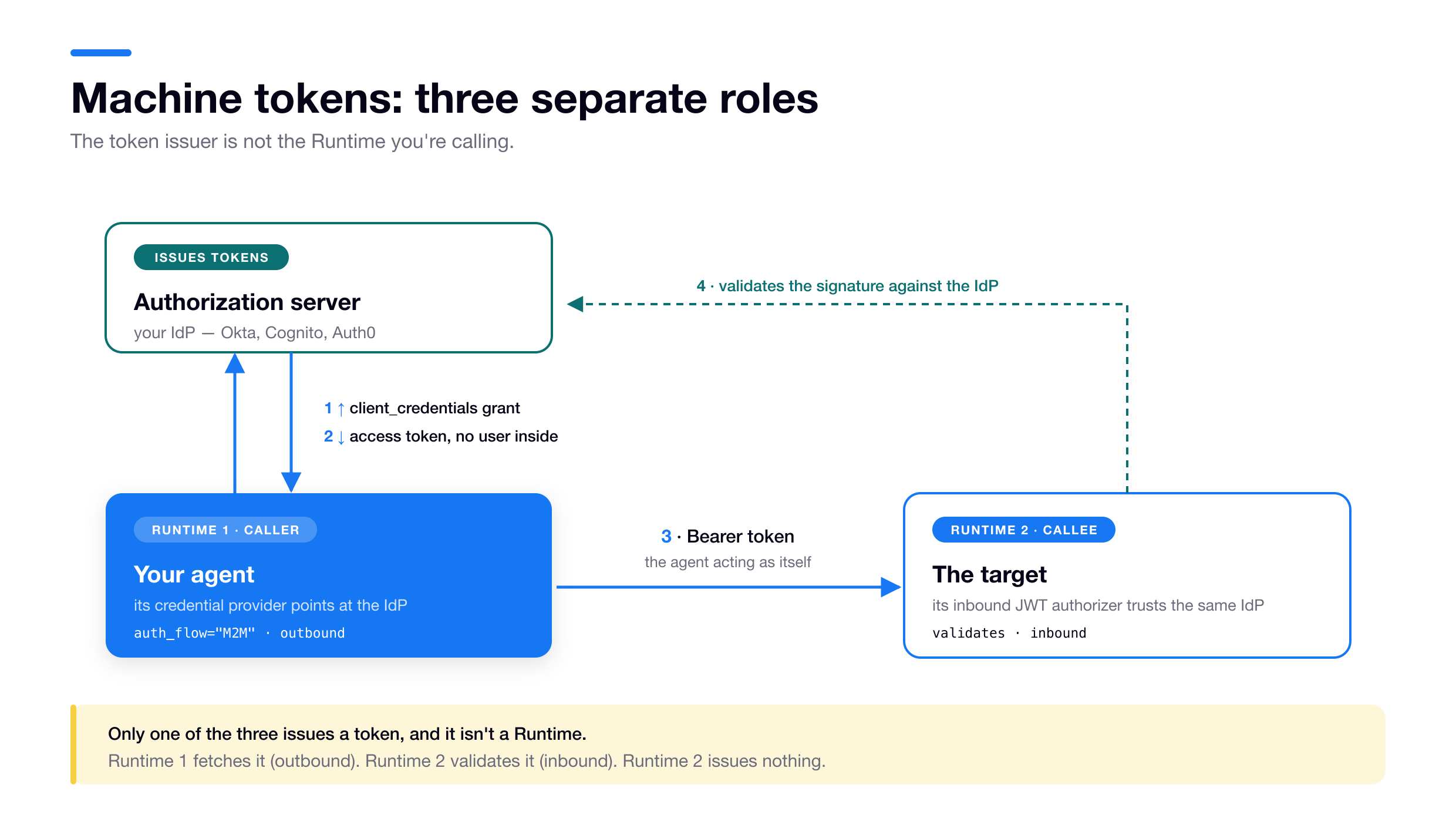
Your IdP issues the token. Runtime 1 has a credential provider that fetches it, which is outbound. Runtime 2 has its own inbound JWT authorizer that trusts the same IdP and validates it. Runtime 2 issues nothing.
from bedrock_agentcore.identity.auth import requires_access_token

@requires_access_token(
    provider_name="auth0-gateway-provider",
    scopes=["invoke:gateway"],
    audiences=["https://my-api.example.com"],   # see note below
    auth_flow="M2M",                            # client credentials, no user
)
async def call_gateway(*, access_token: str):
    ...
Source: adapted from AgentCore identity authentication.
That audiences argument is easy to leave out and hard to debug when you do. Some authorization servers key the client-credentials grant on the audience rather than on scopes: with Auth0, the API identifier goes there, and without it you get a token the downstream rejects. Whether you need it is your IdP’s contract, not AgentCore’s.
M2M is agent-only, so unlike 3LO it does have a valid mint fallback. The raw version reads the injected token when there is one and mints an agent-only token when there isn’t:
import os
import boto3
client = boto3.client("bedrock-agentcore", region_name="us-east-1")
STANDALONE_WI = os.getenv("STANDALONE_WORKLOAD_IDENTITY_NAME")   # one you created

WAT_HEADERS = ("workloadaccesstoken",
               "x-amzn-bedrock-agentcore-runtime-workload-accesstoken")

def read_injected_wat(headers) -> str | None:
    return next((headers[n] for n in WAT_HEADERS if headers.get(n)), None)

wat = read_injected_wat(request.headers)
if wat is None:                                   # bare SigV4, no User-Id
    wat = client.get_workload_access_token(
        workloadName=STANDALONE_WI,               # an identity YOU created
    )["workloadAccessToken"]

token = client.get_resource_oauth2_token(
    resourceCredentialProviderName="auth0-gateway-provider",
    oauth2Flow="M2M",
    workloadIdentityToken=wat,
    scopes=["invoke:gateway"],                    # required even when empty: pass []
    audiences=["https://my-api.example.com"],     # omit if your IdP doesn't want it
)["accessToken"]
M2M returns the accessToken on the first call, with no authorizationUrl, no sessionUri, no polling and no callback endpoint. That’s the whole difference from 3LO on the wire. (The read-or-mint rule covers read_injected_wat and the scopes trap.)
Downstream sees the agent itself, a client-credentials identity, with no user, and the provider access token is vaulted agent-only.
Prereqs: configure the auth server and client credentials first, then the credential provider, then register its callback URL. (auth_flow="M2M" reference)
No user anywhere? That’s a perfectly normal setup, not a degenerate one. A backend invoking your agent with an M2M JWT or IAM SigV4, your agent reaching downstream with SigV4 or client credentials, uses AgentCore Identity end to end with no human identity in the chain. The directory, credential providers, and Vault all operate in agent-only mode. User identity is something you opt into.
What the workload access token actually is #
Every mechanism above, API keys, 3LO, passthrough, OBO and M2M, quietly depended on the same thing. Each one needed a workload access token, which I kept calling the key to the Vault and promised to explain properly.
An AWS-signed, opaque token representing your agent’s workload identity, bound to a user when there is one.
It is not the inbound JWT the caller presented. It is not the provider access token you eventually send to Google or Slack. It sits between them with one job: authorize your agent against AgentCore’s own first-party services, the Token Vault and the credential providers.
AWS is blunt that it’s “exclusively for accessing AWS first-party AgentCore services and cannot be used for external services.” You cannot call Google with it, and there’s no clever way to make it work.
What’s inside it (I tried to decode one)
The header value is an AWS Encryption SDK message. It base64-decodes to a blob starting AgV4…: format version 0x02, a committing and ECDSA-P384-signed AES-256-GCM suite.
Its encryption context is cleartext routing metadata. I could read DataType=WorkloadAccessToken, Service=ACPS (AgentCore’s identity service), my CustomerAwsAccountId, and an aws-crypto-public-key.
But the body is wrapped by a KMS key in an AWS-service-owned account, arn:aws:kms:…:677273280899:key/…, not your account. So there’s no decrypting it client-side.
That’s the design. The envelope is readable enough to route, the payload is sealed to AgentCore. It’s also why you can’t recover the user id, or anything else, from it inside your container.
Three tokens, three roles. The vocabulary from earlier, pinned down:
| Inbound JWT | Workload access token | Provider access token (outbound) | |
|---|---|---|---|
| Issued by | The caller’s IdP (Cognito, Auth0, Okta) | AWS / AgentCore Identity | The external provider (Google, Slack) |
| Represents | The end user | Agent identity + user identity, bound together | Delegated access to the external resource |
| Format | JWT (iss / sub) | AWS-signed opaque token | Provider’s access token |
| Presented to | Your agent, as inbound auth | AgentCore’s Token Vault / credential providers | The external API |
| You use it to | Prove who the caller is (inbound) | Unlock the Vault (mint, then spend) | Actually call the downstream API |
The three on-ramps for minting one #
The mechanics are two hops. First you mint a workload access token from whatever user identity you have. There are exactly three on-ramps and they map onto the Runtime-versus-self-hosted distinction.
| Your situation | How user identity arrives | Bridge API | User-token mechanisms this opens |
|---|---|---|---|
| JWT inbound (on a Runtime) | Verified iss + sub claims | GetWorkloadAccessTokenForJWT | Originate (3LO), Exchange (OBO), Forward (passthrough) |
| IAM inbound + User-Id header | An unverified header your caller supplies | GetWorkloadAccessTokenForUserId | Originate (3LO) via the header path |
| Self-hosted (no authorizer) | You assert it, a JWT or an opaque user id | GetWorkloadAccessTokenForJWT / ForUserId, called by you | Originate (3LO), Exchange (OBO), with the identity you assert |
| No user at all | It doesn’t | GetWorkloadAccessToken (agent-only) | Agent-only (M2M / SigV4) |
Then you spend it. Hand it to GetResourceOauth2Token or GetResourceApiKey as the workloadIdentityToken parameter and AgentCore returns the real provider access token from the Vault, scoped to exactly the agent + user the workload access token encodes.
Step zero: do you already have one?
Before minting anything, check whether the platform handed you a token. On a Runtime it usually has, and minting a second one is both wasteful and, for user-scoped work, wrong.
What to do when the header is empty depends on what kind of credential you’re after, and the split is sharp:
| You’re fetching | Token was injected | Nothing was injected |
|---|---|---|
| API key or M2M (agent-only) | Use it. It may be user-bound; harmless here. | Mint an agent-only token against a workload identity you created. |
| 3LO, OBO, passthrough (user-scoped) | Use it. The user binding is the entire point. | You can’t substitute. An agent-only token names no user, so there’s no (agent + user) Vault entry for it to reach. Fix the inbound path instead: have the caller send User-Id, or move the Runtime to JWT inbound. |
That bottom-right cell is why my 3LO and M2M handlers return 401 rather than falling back to a mint: on a JWT Runtime a missing token means something upstream is broken, and papering over it with an agent-only token would either fail at the Vault or quietly bind the wrong subject.
The read half is then the same in every raw handler:
# The Runtime sends the same value under both names. Lookups are case-insensitive,
# but they are not hyphen-insensitive, so match these exact spellings.
WAT_HEADERS = ("workloadaccesstoken",
               "x-amzn-bedrock-agentcore-runtime-workload-accesstoken")

def read_injected_wat(headers) -> str | None:
    return next((headers[n] for n in WAT_HEADERS if headers.get(n)), None)
Mint and spend, in code
The mint half is what you write when read_injected_wat comes back None and you’re off a Runtime entirely. It’s also what @requires_access_token does for you, so you’d normally only write it by hand off the Runtime, or from a language without the SDK. The two are alternatives: use the decorator or call these APIs directly, never both.
import boto3

# Data-plane client. On a Runtime you rarely need this, the decorator does all of it.
client = boto3.client("bedrock-agentcore", region_name="us-east-1")

# 1) MINT a workload access token. Off-Runtime you assert the user by passing their
#    inbound JWT; on a Runtime this token is minted and injected for you instead.
wat = client.get_workload_access_token_for_jwt(
    workloadName="my-demo-agent",          # your self-created workload identity
    userToken="<end-user-jwt>",
)["workloadAccessToken"]                    # response field is 'workloadAccessToken'

# 2) SPEND it. Every spend call takes the token as `workloadIdentityToken`; which call
#    and which flow depends on the credential. This is the API-key one, the shortest.
api_key = client.get_resource_api_key(
    resourceCredentialProviderName="my-api-key-provider",
    workloadIdentityToken=wat,
)["apiKey"]
Source: request and response shapes from the GetResourceOauth2Token and GetWorkloadAccessTokenForJWT API references. IdentityClient("us-east-1").get_workload_access_token(workload_name=…, user_token=…) is a thin SDK convenience over step 1.
The OAuth spend calls are the same shape with get_resource_oauth2_token and an oauth2Flow. 3LO is the only one with a second half, because it’s the only one that has to wait for a human; M2M and OBO return the credential on the first call.
A couple of things to notice while the two tokens are side by side. The decorator’s auth_flow and callback_url are friendly names for the API’s oauth2Flow and resourceOauth2ReturnUrl, same concepts one layer down. And the credential you get back is the provider access token, while the workloadIdentityToken you passed in is the workload access token. Two different tokens in one call, which is why keeping the names straight matters.
One scoping note before the calls. Everything in this guide describes what AgentCore Identity will do for you. Your agent is ordinary code, and nothing stops you from running IAM inbound with no header and implementing the authorization-code grant yourself, with your own OAuth client, callback endpoint, and encrypted store. That’s a legitimate architecture. The price is that you’ve rebuilt the Token Vault by hand: secure storage, encryption, refresh, agent + user scoping, session binding. So treat the managed mechanisms as the list of things AgentCore does for you, not the list of things you’re allowed to do.
When the Runtime hands you nothing #
Two situations the docs leave you to work out. I couldn’t find the first one documented anywhere.
You can’t mint against the Runtime’s identity, but you can bring your own
The Runtime’s service-managed identity is blocked from GetWorkloadAccessToken* (WorkloadIdentity is linked to a service and cannot retrieve an access token by the caller), so the usual raw-on-Runtime path reads the injected token. The neighbouring mistake fails differently: a workloadName that isn’t in your account gives you AccessDeniedException: Workload Identity does not belong to caller account.
But nothing stops you, from inside the Runtime, minting against a self-created workload identity. That turns out to be the answer to an otherwise dead-end scenario.
Picture an AWS-credentialed backend invoking your IAM-inbound Runtime with no User-Id header and no M2M token, where the agent needs an agent-level secret like an API key. There’s no injected token, since I verified bare SigV4 injects nothing, and you can’t mint against the Runtime’s blocked identity.
The way out is to create your own workload identity, then from the agent mint an agent-only token against it and spend it. Verified end to end on a Runtime:
import os
import boto3
client = boto3.client("bedrock-agentcore", region_name="us-east-1")

# A workload identity YOU created, via CloudFormation
# AWS::BedrockAgentCore::WorkloadIdentity or `create-workload-identity`.
STANDALONE_WI = os.getenv("STANDALONE_WORKLOAD_IDENTITY_NAME")

wat = client.get_workload_access_token(workloadName=STANDALONE_WI)["workloadAccessToken"]  # agent-only, no user
api_key = client.get_resource_api_key(
    resourceCredentialProviderName="my-provider", workloadIdentityToken=wat,
)["apiKey"]
Grant the execution role GetWorkloadAccessToken on that identity’s ARN, plus the usual GetResourceApiKey and secretsmanager:GetSecretValue. In my test this returned the key while the injected-token and decorator paths came up empty, because it doesn’t depend on anything the Runtime injects.
The same pattern works for outbound M2M, not just API keys. Swap the spend call for get_resource_oauth2_token(oauth2Flow="M2M", scopes=[...], workloadIdentityToken=wat) and it returns the machine token. Also verified under bare SigV4, where the decorator path instead fabricate-failed with CreateWorkloadIdentity AccessDenied.
So bringing your own workload identity is the general agent-only escape hatch, API key or M2M, whenever the Runtime injects no token.
The decorator’s fabricate path always binds to a user
Whenever no token is in context and DOCKER_CONTAINER is not 1, which the SDK calls its “local dev” path but which also fires on a Runtime under bare SigV4, @requires_access_token and @requires_api_key call CreateWorkloadIdentity, fabricate a user id (an 8-char UUID slice), cache both in .agentcore.json, and mint via GetWorkloadAccessTokenForUserId.
Confirmed in a local run. The file holds {"workload_identity_name": …, "user_id": …} and the SDK logs “Found existing workload identity from …/.agentcore.json”. Some AWS docs still call this file .bedrock_agentcore.yaml.
So even API-key and M2M go through a user-bound token on this path, which is why such a run can behave differently from a production one using the real injected token.
Reading the injected token
How you get at the Runtime-injected token depends on whether you run inside the SDK’s server.
With BedrockAgentCoreApp (runtime/app.py), its server already read the header into a request-scoped context, so use the accessor from runtime/context.py. This is what the decorator does under the hood:
from bedrock_agentcore.runtime.context import BedrockAgentCoreContext
wat = BedrockAgentCoreContext.get_workload_access_token()   # -> str | None
There’s also a decorator for this, if you’d rather not touch the context object. @requires_wat reads the same token out of the context and passes it into your function, defaulting to the identity_wat keyword argument (identity/auth.py):
from bedrock_agentcore.identity.auth import requires_wat

@requires_wat()
async def fetch_something(*, identity_wat: str):
    # spend identity_wat directly as workloadIdentityToken
    ...
With your own FastAPI or Flask server, nothing populates that context, so read the header off the request yourself with read_injected_wat and either pass the result to get_resource_* as workloadIdentityToken or call BedrockAgentCoreContext.set_workload_access_token(wat) so the decorator finds it. That second option is exactly what BedrockAgentCoreApp does for you before your handler runs.
Either route only yields a token when the Runtime actually injected one, so JWT or IAM plus User-Id inbound. Under bare SigV4 you get None, and the read-or-mint rule takes over.
The short version of the plumbing #
The workload access token is a Vault key and nothing else: opaque, AWS-signed, sealed to an AWS-owned KMS key. Don’t try to read a user id out of it.
Underneath, there’s one pipeline. The Runtime spares you the identity and the mint, since it owns one and injects the other, and the decorator spares you the spend and the 3LO poll. Strip both away and what’s left is:
CreateWorkloadIdentity → GetWorkloadAccessToken* → GetResource{Oauth2Token,ApiKey}
with CompleteResourceTokenAuth bolted on for the one workflow that needs human consent. Self-hosting means writing those calls yourself, on the same pipeline with the lid off.
Bring your own workload identity when the Runtime gives you nothing. Bare SigV4 with no user injects no token and the managed paths dead-end, but a self-created identity plus an agent-only mint works. I tested it for both API keys and M2M.
Two IAM permissions, always. bedrock-agentcore:GetResource* and secretsmanager:GetSecretValue. If you remember one operational fact from all of this, make it that one.
Test your understanding
- What are the two M2M flavors and how do you choose between them?
- What is the workload access token and what can you not do with it?
- What are the three APIs for minting one, and what decides which of them you call?
- The platform injected no token. What do you do if you’re fetching an API key, and what do you do if you’re running 3LO?
- What is the full API pipeline once you remove both the Runtime and the decorator?
Everything from here down is meant to be skimmed and bookmarked rather than read straight through.
The whole model in five lines.
- Inbound (who may call your agent) and outbound (how your agent reaches everything else) are independent systems.
- Inbound lives on the Runtime or Gateway. Outbound works anywhere you have AWS credentials.
- For outbound, the target picks the mechanism: nothing, an API key, a user’s token, or a machine token.
- “Act as a user” has three answers: originate (3LO), forward (passthrough), exchange (OBO).
- Underneath all of it:
CreateWorkloadIdentity→GetWorkloadAccessToken*→GetResource{Oauth2Token,ApiKey}.
Every API call, in every mode #
The decorator is wonderful right up until you self-host, at which point it stops hiding the machinery and you need to know exactly which APIs fire, in what order. This is the lookup version; the narrative is back in the plumbing.
The universal skeleton
Strip away the workflow-specific details and every outbound credential fetch is the same three steps.
- Have a workload identity. The agent needs an entry in the Agent Identity Directory.
- Mint a workload access token from an identity. Three variants:
GetWorkloadAccessToken(agent-only, no user),GetWorkloadAccessTokenForJWT(user, from a JWT),GetWorkloadAccessTokenForUserId(user, from an opaque string). - Spend it to pull the real credential out of the Token Vault.
GetResourceOauth2Tokenfor OAuth workflows,GetResourceApiKeyfor API keys, passing the workload access token asworkloadIdentityToken.
The authorization-code (3LO) workflow inserts one detour into step 3. If the provider token isn’t in the Vault yet, GetResourceOauth2Token returns an authorizationUrl instead of an accessToken. The user consents, your session-binding endpoint (b) calls CompleteResourceTokenAuth, and then step 3 is re-called, echoing sessionUri, until the accessToken appears.
No other workflow has that detour. M2M, OBO, and API-key all return their credential on the first call.
Who makes each call
The two axes are independent. Runtime versus self-hosted decides who does steps 1 and 2. Decorator versus raw decides who does step 3, and the 3LO polling.
| Step 1 · workload identity | Step 2 · workload access token | Step 3 · fetch the credential | |
|---|---|---|---|
| Decorator · on Runtime | Service-managed, auto | Runtime mints and injects it; decorator reads it from context | Decorator calls GetResource* and returns the credential to your function |
| Decorator · no token in its context | Decorator auto-creates one (CreateWorkloadIdentity) and caches its name in a local .agentcore.json | Decorator mints it, with a fabricated user id | Decorator calls GetResource* |
| Raw API · on Runtime | Service-managed, auto, or one you create yourself | Read the injected token, or mint against your own workload identity (not the Runtime’s, that one’s blocked) | You call GetResource* |
| Raw API · self-hosted | You call CreateWorkloadIdentity | You call GetWorkloadAccessToken* | You call GetResource* |
Two of those rows have more to them than fits in a cell: what to do when the Runtime injects nothing, and what the decorator does instead of failing.
The exact calls, per workflow
Every entry below is step 2 (mint) plus step 3 (spend) from the skeleton. The mint call is what you write self-hosted; on a Runtime it’s replaced by the injected token.
| Workflow | Mint (self-hosted) | Spend | 3LO detour? | Result field |
|---|---|---|---|---|
| Authorization code (3LO) | get_workload_access_token_for_jwt / _for_user_id (user-bound) | get_resource_oauth2_token(oauth2Flow="USER_FEDERATION", …) | Yes. authorizationUrl → complete_resource_token_auth → re-poll | accessToken |
| Client credentials (M2M) | get_workload_access_token (agent-only)¹ | get_resource_oauth2_token(oauth2Flow="M2M", …) | No | accessToken |
| On-behalf-of (OBO) | get_workload_access_token_for_jwt (user-bound) | get_resource_oauth2_token(oauth2Flow="ON_BEHALF_OF_TOKEN_EXCHANGE", …) | No | accessToken |
| API key | get_workload_access_token (agent-only)¹ | get_resource_api_key(…) | No | apiKey |
¹ At the API level, M2M and API-key need no user, since GetWorkloadAccessToken takes no user parameter. But the decorators don’t guarantee an agent-only token. They reuse whatever workload token is present, which is user-bound if the Runtime was invoked with a JWT or User-Id header, and always user-bound in local dev. If you specifically want an agent-only token, mint it yourself with GetWorkloadAccessToken.
All the spend calls take the same two required arguments, resourceCredentialProviderName and workloadIdentityToken, plus oauth2Flow and scopes for the OAuth ones.
And scopes is required even when you have none. Pass []. Omit it and the raw call fails with ParamValidationError: Missing required parameter in input: "scopes". The decorator hides this because the SDK always sends scopes, so it’s a trap only hand-rolled raw calls hit. I found it on an M2M call with no scopes.
Each workflow’s raw code sits with the workflow: 3LO, M2M, API key, and the completion call your callback endpoint makes in the recipe. For OBO, see AWS’s on-behalf-of page, for the reasons given earlier.
Naming note for all of them: parameters and response fields come from IdentityClient.get_token and get_api_key in services/identity.py, which forwards them verbatim to the bedrock-agentcore boto3 client. Every one of them is in the API reference if you want the full request and response shapes.
The outbound mechanisms, compared #
Organized by what the target expects. The first three columns tell you when. The rest carry the operational attributes.
| Target expects | Mechanism | What triggers it | User consent | Credential provider | Token Vault | Refresh |
|---|---|---|---|---|---|---|
| Nothing (network-only) | Networking, not Identity | n/a | n/a | n/a | n/a | n/a |
| API key | API-key provider | @requires_api_key | No | Yes (API-key) | Yes | n/a (static) |
| User token, start fresh | Originate · 3LO | auth_flow="USER_FEDERATION" | Yes (once) | Yes | Yes | Auto (refresh token) |
| User token, same audience | Forward · passthrough | header allowlist, no flow | No | No | No | None, user’s expiry |
| User token, new audience | Exchange · OBO | oauth2Flow="ON_BEHALF_OF_TOKEN_EXCHANGE" | No (reuses prior) | Yes | Yes | Re-exchange |
| User token, under IAM inbound | + User-Id header | X-Amzn-…-Runtime-User-Id | (as 3LO) | (as chosen) | Yes | (as chosen) |
| M2M token, AWS/IAM target | Just sign it · SigV4 | your execution role | No | No | No | n/a (IAM rotates) |
| M2M token, OAuth target | Client credentials · 2LO | auth_flow="M2M" | No | Yes | Yes | Auto (re-fetch) |
Refresh in plain terms: 3LO and M2M renew themselves silently, since AWS stores refresh tokens with roughly 30-day default lifetimes against 1 to 2-hour access tokens. Passthrough can’t renew, so when the user’s token dies the call dies. Plan long tasks accordingly. (Refresh behavior)
When do you need your own workload identity? #
A Runtime or Gateway gets a service-managed one automatically, and most agents never create another. Four cases where you do:
- Self-hosted. Nothing created an identity for you, so you call
CreateWorkloadIdentity. The SDK decorator will also do it unprompted whenever no workload access token reaches its context, which has its own hazards. - On a Runtime that injects no workload access token. Bare IAM SigV4 with no
User-Idheader injects nothing, and the Runtime’s service-managed identity is blocked from minting a token for itself (WorkloadIdentity is linked to a service and cannot retrieve an access token by the caller). If the agent needs an outbound API key or an M2M token there, create an identity you can mint against. Verified code. - To register a 3LO return URL up front. The service-managed identity doesn’t exist until the runtime is deployed, so declaring
AllowedResourceOauth2ReturnUrlahead of time means creating your own identity and minting against it explicitly. That trades the managed decorator path for the raw one. More here. - To scope credential-provider access. Nothing binds an agent to a provider by default, so isolation is something you build: separate workload identities and separate execution roles, with each role’s
Resourcescoped to specific provider ARNs. The role is the IAM principal doing the scoping; the separate identities are what let the roles differ per agent. More here.
Which mechanism do I use? #
Every branch below is a question about the target, not your taste.
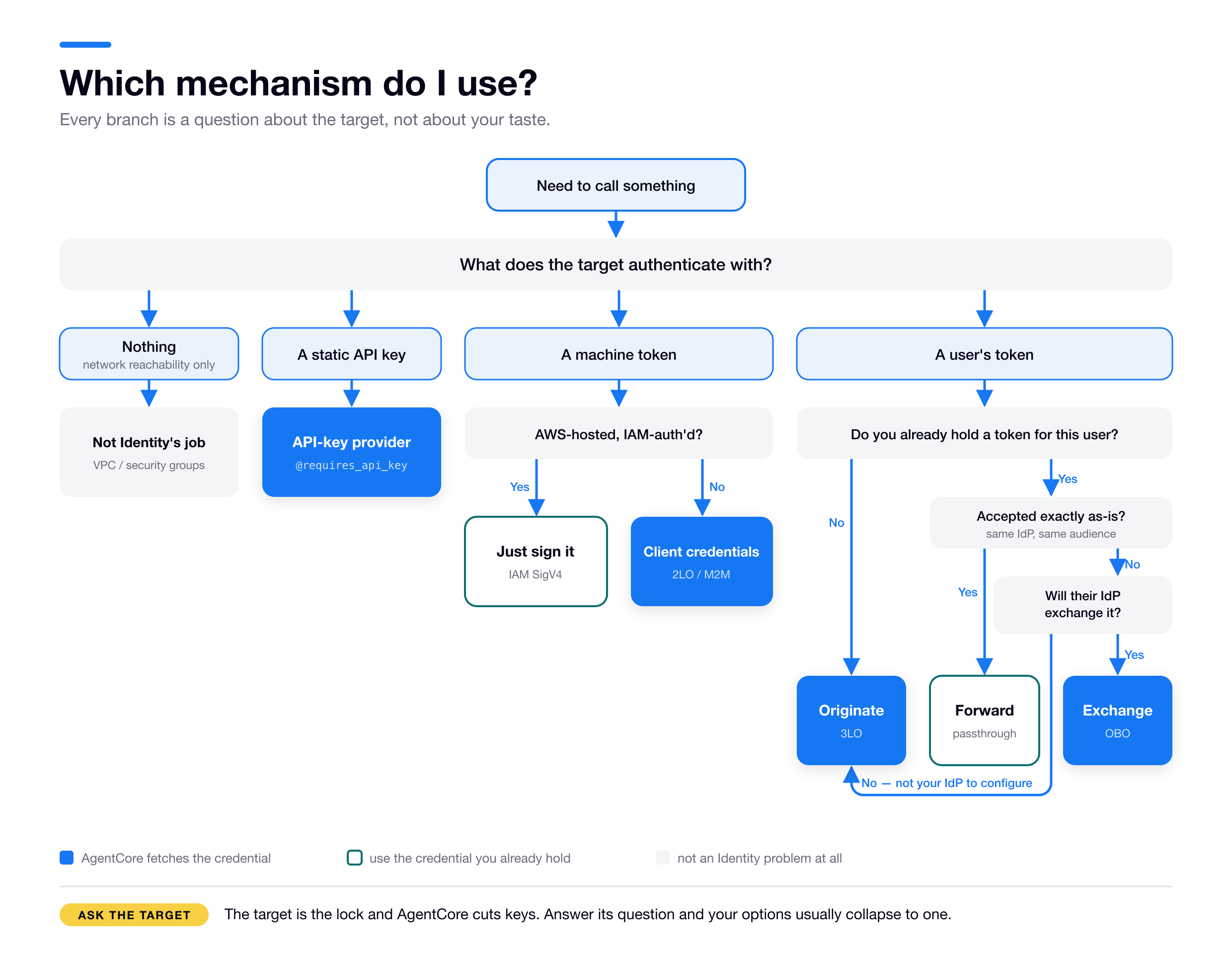
Orange means mint or broker a token, so credential provider plus Vault. Teal means reuse an identity you already hold. Grey means it isn’t an Identity problem at all.
If the target is IAM-inbound but you still need user-scoped operations, layer the User-Id header on top.
When it breaks: inbound or outbound? #
Start by asking which direction is failing, because the fixes have nothing in common.
| Symptom | Likely direction | First thing to check |
|---|---|---|
403 / AccessDenied invoking your agent | Inbound | Caller’s IAM action (InvokeAgentRuntime), or JWT audience/client mismatch in the authorizer |
| Caller’s JWT rejected at the door | Inbound | Discovery URL, allowedClients/allowedAudience, token expiry |
| 3LO auth URL appears, then nothing returns | Outbound | Session binding. Is your endpoint (b) reachable and calling CompleteResourceTokenAuth? Not the auto-generated (a) URL you gave Google |
AccessDeniedException: Invalid or expired session on completion | Outbound | Wrong userIdentifier type. userToken for JWT inbound, userId for IAM plus User-Id (the rule) |
Downstream returns 401 / invalid_audience | Outbound | Wrong mechanism. Passthrough where the audience differs; use OBO |
GetResourceOauth2Token access denied | Outbound | IAM scoping of GetResourceOauth2Token to the workload-identity ARN |
Access denied when retrieving secret … | Outbound | Missing secretsmanager:GetSecretValue on the provider’s backing secret. The API reads it as your role |
| Token works locally, fails deployed | Outbound | Local-versus-Runtime identity difference, random local user id |
| Long task fails partway through | Outbound | Passthrough token expired mid-task. Switch to a refreshable flow |
WorkloadIdentity is linked to a service… | Outbound | You’re minting a workload token with a Runtime-managed identity. Use a self-created one |
AccessDeniedException: Workload Identity does not belong to caller account | Outbound | The workloadName you passed doesn’t exist in your account. Create it with create-workload-identity |
ParamValidationError: Missing required parameter … "scopes" | Outbound | Raw OAuth spend calls require scopes even when empty. Pass [] |
| Decorator fabricates an identity on a Runtime that did inject a token | Outbound | Nothing put the header into the SDK context. With a BYO server, read it yourself, or check the header spelling: workloadaccesstoken and x-amzn-bedrock-agentcore-runtime-workload-accesstoken, hyphen included (read-or-mint) |
| Downstream rejects an M2M token that looks valid | Outbound | Some IdPs key client-credentials on audiences rather than scopes. Auth0 wants the API identifier there (M2M) |
| 3LO completes but the grant lands under no user | Outbound | You minted an agent-only workload access token instead of reading the injected user-bound one. 3LO and OBO can’t use a substitute (read-or-mint) |
When in doubt, AWS’s runtime auth page has the authoritative OAuth error reference.
Edges and limits #
The unglamorous details that save you a support ticket later.
- Header allowlist: up to 20 headers per Runtime, each 4KB or less. Reserved
x-amzn-*headers can’t be forwarded, exceptX-Amzn-Bedrock-AgentCore-Runtime-Custom-*. (Headers) - Token lifetimes: access tokens commonly 1 to 2 hours, stored refresh tokens default to around 30 days. Tokens can be revoked provider-side without AgentCore knowing, so set
force_authentication=Trueto force a clean re-auth. (Lifecycle) - Per-agent provider access is opt-in. By default AgentCore enforces no binding between a workload identity and a provider, so any authorized caller can read any provider in the account. To restrict it, scope
GetResourceOauth2TokenandGetResourceApiKeyin the role’s IAM policy to specific workload-identity and provider ARNs, and useDenyfor hard guardrails. (Scope provider access) - Quotas: credential-provider counts and other limits live in AgentCore Identity service quotas. Check them before designing for thousands of providers.
- Gateway visibility: with a Cedar policy (Cedar is AWS’s open-source authorization-policy language, the same one used by Verified Permissions), denied tools don’t even appear in
tools/list, since “Tools that are denied by policies will not appear in the list.” With interceptors (Lambda), nothing is filtered unless you write a RESPONSE interceptor to do it. (Policy, Interceptors)
FAQ #
What do you mean by an “AWS-credentialed process”? Any code running with AWS credentials available to it, the same thing the AWS CLI or an SDK needs to make a call. Your laptop after aws configure. A Lambda function or EC2/ECS task running under an IAM role. A CI job that has assumed a role. If it can call AWS APIs it can use AgentCore Identity’s outbound features. Nothing AgentCore-specific about it, and no Runtime required.
Do I have to use the @requires_access_token decorator, or can I call the token APIs directly? Either, they’re two ways to do the same thing, and you pick one per code path rather than mixing them. Reach for the raw APIs when the decorator doesn’t fit: self-hosted code, another language, or when you want explicit control over the poll. The calls, in order.
Is the inbound authorizer part of AgentCore Identity, or is Identity only outbound? Part of Identity. AWS calls inbound auth “powered by AgentCore Identity,” and the Identity terminology page defines the “OAuth 2.0 authorizer” as a term of art. The nuance is that you don’t create an authorizer as a standalone Identity object, you attach one (authorizerConfiguration) to a Runtime or Gateway. The outbound pieces, workload identities, credential providers, and the Vault, are standalone Identity resources, which is why Identity gets mistaken for outbound-only. (Runtime concepts, terminology)
Does AgentCore Identity require an end-user identity? No. A chain with no human in it anywhere uses Identity end to end, with tokens vaulted agent-only. User identity is something you opt into.
Do I have to build and deploy a separate server just to handle the 3LO redirect? Only for endpoint (b), never for (a), and the split is dev versus production rather than Runtime versus self-hosted. It doesn’t have to be a dedicated server either; a single route in the web app that already fronts your agent is enough. (More here)
My Runtime uses IAM inbound. Can I still run a 3LO flow for my users? Yes. The managed way is the User-Id header. The DIY way is to pass a user id in the request payload and implement the OAuth flow yourself, at which point token storage, encryption, refresh and per-user scoping all become yours to build and secure.
How do I get the end-user’s id inside my agent? First check whether you actually need it, because for identity and credential work you usually don’t. The runtimeUserId you pass on invoke is for the platform: it scopes the Vault, so @requires_access_token and GetResourceOauth2Token already return that user’s token automatically. You only need the raw id for your own logic, like per-user lookups or logging.
When you do, you have to supply it yourself. The reserved X-Amzn-Bedrock-AgentCore-Runtime-User-Id header is consumed server-side and never reaches your container. I verified it’s absent from the request, and you can’t allowlist it, because the API rejects reserved x-amzn-* headers with a 400. Two ways to pass it: put it in the request payload, which is simplest since the caller already knows it, or send it as a custom allowlisted header X-Amzn-Bedrock-AgentCore-Runtime-Custom-UserId, since the …-Custom-… prefix is allowlist-able.
You cannot recover it from the injected workload access token, which is an opaque KMS-encrypted blob. And both hand-passed values are unverified, exactly like runtimeUserId itself. If you need a cryptographically verified user id in the container, use JWT inbound and read the token’s sub, forwarding Authorization via the allowlist.
If you’re starting today #
Five opinions, earned the hard way.
Get inbound versus outbound straight before you write a line of agent code. Almost every confusion downstream traces back to blurring them. Inbound is a Runtime concern, a Gateway has its own for whoever calls it, and outbound works anywhere.
Let the target choose the mechanism. The external system’s auth method is a hard constraint, not a preference. Identify it first (nothing, key, user token, machine token) and your options usually collapse to one. Then optimize for simplicity within what’s left. Inside AWS with no user identity? Just sign it.
For user data, budget for session binding. It’s the step that turns a 30-minute 3LO demo into a half-day. Stand up the callback endpoint first, before the agent.
Treat the User-Id header as a last resort in production. If you can use JWT inbound, do. Verified identity beats a trusted-by-IAM string.
And one more, free: test the deployed path. Local runs use a fabricated identity and a fabricated user, so a green laptop test tells you your syntax is right and almost nothing else.
Most of what’s here took a test run or a wrong turn to find out, which is the only reason it’s written down. If you’re building agents that have to act securely on behalf of real users and this saved you an afternoon, that was the point.
We do this for a living at Loka. If you’re wrestling with an agent architecture, talk to us.
Further reading #
- Supported authentication patterns (3LO / M2M / OBO)
- AgentCore Identity overview · terminology · key features (self-hosted/hybrid)
- Understanding workload identities · create & manage them · obtain credentials
- On-behalf-of token exchange
- Inbound & outbound auth (runtime) · inbound JWT authorizer
- OAuth2 authorization URL & session binding
- Google Drive 3LO tutorial · sample callback server (AWS docs link a stale path)
- Credential providers (OAuth / API key / payment) · OAuth2 vendor list
- Custom header allowlist · Scope credential provider access
- Get workload access token · InvokeAgentRuntime API
- Gateway core concepts · inbound auth · target outbound auth
- Use a gateway with policy (Cedar) · interceptors
- AgentCore Identity service quotas
- mcp-proxy-for-aws · Strands MCP tools
- AgentCore Python SDK source, worth reading directly when the docs are silent:
identity/auth.py(the decorators, theDOCKER_CONTAINERbranch,_set_up_local_auth) ·services/identity.py(IdentityClient,get_token,get_api_key,TokenPoller) ·runtime/context.py·runtime/app.py
Each block links back to the section it came from, in case an answer doesn’t match what you had.
Answers: the model #
1. What’s the difference between inbound and outbound authorization? Inbound is who may invoke your agent, enforced by the authorizer on a Runtime or Gateway. Outbound is how your agent proves itself to everything it calls, and it works from any process with AWS credentials. They never consult each other, so any combination is legal, and they touch at exactly one point: user identity. (Section)
2. What are the core primitives and what’s the purpose of each one? Three on the outbound side, and the useful axis is who provisions them. The Agent Identity Directory is the per-account registry of workload identities, created automatically. Credential providers describe how to authenticate to an external service, and they’re always yours to create. The Token Vault is encrypted storage for the credentials themselves, keyed by agent plus user, provisioned for you. The inbound authorizer sits alongside them, part of Identity but not a standalone resource. (Section)
3. What are the three kinds of token and what is each one used for? The inbound JWT is what the caller presents in order to invoke your agent, issued by the caller’s IdP, identifying the caller; your agent is the resource server and validates it. There is none when inbound is IAM. The provider access token is what your agent presents to the outbound system, issued by that external service, and it’s what the Vault stores; your agent is the client in that exchange. The workload access token is the key your agent uses to get the provider access token out of the Vault, issued by AWS, representing your agent bound to a user when there is one, and usable against AgentCore’s own services only. (Section)
Answers: where your agent runs #
1. What are the Runtime’s three jobs, and which do you take over? It validates the caller and extracts an identity, resolves your agent’s workload identity, and mints a workload access token binding those two together and injects it as a request header. Self-hosted you take over all three: no authorizer exists, you create the workload identity with CreateWorkloadIdentity, and you assert user identity through GetWorkloadAccessTokenForJWT or GetWorkloadAccessTokenForUserId. Everything past those three steps behaves identically either way. (Section)
2. Which inbound configurations inject a token, and which is the default? JWT authorizer: injected. IAM SigV4 plus the X-Amzn-Bedrock-AgentCore-Runtime-User-Id header: injected, and the raw User-Id header is consumed server-side rather than forwarded. Bare IAM SigV4 with no User-Id: nothing is injected. That last one is the Runtime default, so the out-of-the-box configuration is the one that gives your agent nothing to spend at the Vault. (Section)
3. What does the decorator do with no token, and why can that happen in production? It fabricates an identity rather than failing. It checks DOCKER_CONTAINER, and unless that’s "1" it calls CreateWorkloadIdentity, invents a random user id, and caches both in .agentcore.json. Nothing in that decision looks at where the code is running, so it fires in production in two cases: a bring-your-own FastAPI or Flask server, where the header arrives but nothing puts it in the SDK’s context, and an SDK-served Runtime under bare SigV4. A broad IAM role makes it silent. (Section)
Answers: inbound #
1. What are the four inbound options, and what does a JWT authorizer check? IAM SigV4 (the default), IAM plus the User-Id header, JWT bearer, and offloaded (AUTHENTICATE_ONLY / NONE, Gateway only). A JWT authorizer does two separable jobs: it takes iss and sub to build the caller identity that outbound credentials later bind to, and separately it validates allowedClients, allowedAudience and scopes against the token’s client_id, aud and scope to decide whether the call is allowed in at all. (Section)
2. What are your options when one agent needs two kinds of caller? A Runtime supports either IAM SigV4 or JWT, never both at once, and a JWT authorizer points at exactly one IdP. So you front the agent with more than one authorizer: multiple versions of one Runtime, since authorizerConfiguration is frozen into each immutable version, or multiple Runtime instances from the same container image. You don’t need to split for multiple clients or audiences sharing one IdP, since allowedClients and allowedAudience are lists. You do need to split for multiple IdPs. (Section)
Answers: outbound and API keys #
1. What are the four things a target can expect? Nothing, where the network is the auth. A static API key. A user’s access token. Or a machine (M2M) token. The first two involve no identity at all. The target picks, not you. (Section)
2. When is your agent the client and when the resource server? It depends on which resource is being accessed, not on the component. Reaching into a user’s Google Drive, your agent is the client: it holds a token and presents it to someone else’s API. Serving a chat front end that calls it with a token from your own IdP, your agent is the resource server: it holds the protected thing and validates a token before serving it. Same agent, same deployment, same user. That’s the inbound and outbound split in OAuth vocabulary. (Section)
3. Which two IAM permissions does a Vault read require? bedrock-agentcore:GetResourceApiKey or GetResourceOauth2Token, plus secretsmanager:GetSecretValue on the backing secret, because the credential physically lives in a Secrets Manager secret that the AgentCore API reads as your role. The AgentCore-generated role includes neither. (Section)
4. What binds an agent to a credential provider? Your IAM policy, and nothing else. AWS states the service “does not enforce additional binding between workload identities and credential providers in the same account,” so scoping the Resource blocks isn’t hardening layered on a default restriction, it is the restriction. (Section)
Answers: 3LO and passthrough #
1. What are the two callback URLs? (a) The IdP redirect URL is hosted by AWS, arrives as the callbackUrl field in the create-oauth2-credential-provider response, and is the only URL you register at Google. You build and deploy nothing for it. (b) The session-binding endpoint is hosted by you, a route in your own web app, registered with AgentCore on the agent’s workload identity and passed as the decorator’s callback_url. Google never sees (b). The post-consent redirect is a two-hop chain: Google to (a), then AgentCore to (b). (Section)
2. What is the sequence of API calls in a 3LO flow? Your agent makes two, and your callback endpoint makes a third. Read the injected user-bound workload access token (or mint one self-hosted), then call GetResourceOauth2Token with oauth2Flow="USER_FEDERATION" and resourceOauth2ReturnUrl pointing at endpoint (b). On a first connect that returns an authorizationUrl and a sessionUri instead of a token. After consent, endpoint (b) calls CompleteResourceTokenAuth(sessionUri, userIdentifier), which writes the token into the Vault, and your agent’s re-call with the echoed sessionUri finally returns an accessToken. (Section)
3. What is session binding and which attack does it prevent? It’s the check that the person finishing consent is the person the flow was started for. Without it, Mallory starts a flow as himself, sends the authorization URL to Alice, and her token gets filed under Mallory’s agent-plus-user slot. It’s the OAuth cousin of session fixation. AWS enforces that your userIdentifier matches the flow’s originator, but that only means something if you source the identifier from the live browser session rather than from your own records, and AWS’s own sample callback server sources it from records. (Section)
4. What is your agent doing while it waits? Polling, in a live loop. There’s no suspend, checkpoint or continuation: the wrapper sits in a while loop calling GetResourceOauth2Token until a token appears, and your function body hasn’t started. So a human is inside your invocation’s timeout, and only on first consent. (Section)
5. When is passthrough right, and what’s its limit? When you already hold the user’s token and the target accepts that exact token, same IdP and same audience, which usually means you own both ends. The hard limit is that the token carries the user’s expiry and you can’t refresh it, because it isn’t yours. It also requires the token to have arrived inbound as a JWT, which rules it out under IAM inbound. (Section)
Answers: OBO and the User-Id header #
1. What’s the difference between passthrough and OBO? Audience. Passthrough forwards the user’s token unchanged, so it only works where the downstream trusts the same IdP and the same audience. OBO exchanges it for a brand-new token minted for the downstream’s own audience, with no second consent and no browser, and the exchanged token carries both the user’s and the agent’s identity. The moment a downstream rejects your token’s audience, passthrough is dead. OBO replaces it only where the downstream’s authorization server will perform the exchange, which in practice means an IdP you can configure a trust in. Where it won’t, as with Google or Slack, OBO isn’t available and 3LO is the fallback. (Section)
2. Which part of OBO is AgentCore’s and which is your IdP’s? AgentCore only brokers: it takes the inbound token plus the client credentials stored in the credential provider, submits the exchange request, parses the response, and returns it. Your authorization server makes the final call, including whether to permit the delegation at all, and it has to implement RFC 8693 token exchange or RFC 7523 jwt-bearer itself. AWS ships turnkey OBO for MicrosoftOauth2 only; everything else is CustomOauth2 with configuration you own. (Section)
3. What is the User-Id header for, and why can’t you read it? It’s a mint input, not data for your code. Under IAM inbound the caller is an IAM principal, so AgentCore can’t tell Alice’s request from Bob’s; the header supplies the missing identity and rides the GetWorkloadAccessTokenForUserId on-ramp. The Runtime consumes it server-side and injects the resulting token instead, so the raw header never reaches your container, and you can’t force it through the allowlist because reserved x-amzn-* headers are rejected at deploy time. It’s unverified, so prefer JWT inbound in production. (Section)
Answers: machine tokens and the plumbing #
1. What are the two M2M flavors? The target decides. If the downstream is AWS-hosted and IAM-authed, sign the request with your execution role’s credentials: no OAuth, no provider, no Vault. If the target validates OAuth tokens instead, use the client-credentials grant through a credential provider, auth_flow="M2M", and watch the audiences argument, since some servers key client-credentials on audience rather than scopes. (Section)
2. What is the workload access token and what can’t you do with it? An AWS-signed, opaque token representing your agent’s workload identity, bound to a user when there is one, whose only job is to authorize your agent against AgentCore’s own first-party services. You can’t call an external service with it, and you can’t read anything out of it: it’s an AWS Encryption SDK message whose body is wrapped by a KMS key in an AWS-service-owned account, so the user id isn’t recoverable client-side. (Section)
3. What are the three mint APIs and what picks between them? The identity you’re holding. GetWorkloadAccessTokenForJWT when you have the user’s JWT, GetWorkloadAccessTokenForUserId when you have an opaque user id, and GetWorkloadAccessToken when there’s no user at all, which returns an agent-only token. On a Runtime the platform makes one of the first two calls for you and injects the result, so you read it instead of minting. (Section)
4. Nothing was injected. What now? It depends on the credential. For an API key or M2M, both agent-only, mint an agent-only token against a workload identity you created yourself. For 3LO, OBO or passthrough, all user-scoped, there is no substitute: an agent-only token names no user, so there’s no agent-plus-user row in the Vault for it to reach. Fix the inbound path instead. (Section)
5. What’s the pipeline with both conveniences removed? CreateWorkloadIdentity → GetWorkloadAccessToken* → GetResource{Oauth2Token,ApiKey}, with CompleteResourceTokenAuth bolted on for the one workflow that needs human consent. The Runtime spares you the first two steps, the decorator spares you the third plus the 3LO poll. One extra rule: the Runtime’s own service-managed identity is blocked from minting, so minting from inside a Runtime has to be against an identity you created. (Section)
Cite this work
Use this BibTeX entry to cite this technical report.
@techreport{dias2026agentcoreidentity,
  title = {Everything you need to know about Amazon Bedrock AgentCore Identity},
  author = {Matheus Dias},
  institution = {Loka},
  year = {2026},
  url = {https://lokahq.github.io/tech-blog/agentcore-identity/}
}
Tags
Topics