Data Governance in PracticeLineage for a CDC Pipeline on AWS
Published
Data platforms have a way of quietly outgrowing our ability to understand them. At some point you look at your lakehouse and realize you have dozens of tables and dozens of Kafka topics that have some relation to the tables, but you have no real understanding of what these relationships are. You want to clean something up but you start doubting, because you can’t prove nothing depends on it. You add a new table, but it is pretty easy to forget what feeds it, so when a colleague asks a simple question about it, the honest answer is “I think it comes from this topic, but let me check the code first.”
That’s not necessarily a documentation problem, but a visibility one. And visibility can be everything: without it, decisions get harder, trust in the platform erodes, and what looks like a minor annoyance might be a sign of a shaky foundation underneath. Without visibility, maintaining a data platform can feel like archaeology.
This is what data governance is for: knowing what your data is, where it came from, and who’s responsible for it (basically, who to call when something breaks). Data lineage is one piece of that, and in this post, we’re focusing on it specifically: what it is, how we implemented it for a customer project, and what we learned along the way.
What is Data Lineage?#
Data lineage is the map of where data comes from, how it moves, and what happens to it along the way. Think of it as a paper trail, tracing the path from source systems through transformations to consumption.
It answers questions like:
- What feeds this dashboard?
- What transformations happen between raw data and the final metric?
- If something changes upstream, what breaks downstream?
With lineage, those are easily answerable questions.
Implementing Lineage: A Practical Example#
To make this concrete, let’s look at a real implementation.
Last year, we were working on a data platform built on AWS, a pipeline that included CDC (Change Data Capture), that continuously synced source databases into a lakehouse for analytics. The stack:
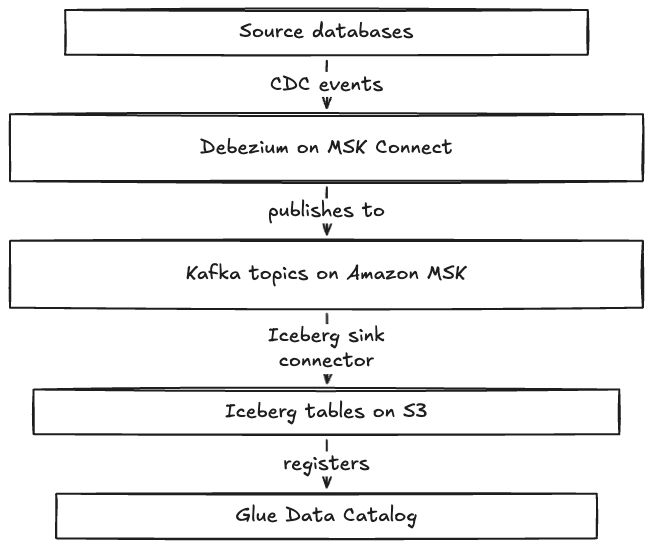
Each component here has its own metadata. The Glue Schema Registry knows about Kafka schemas, Glue Data Catalog knows about Iceberg tables, MSK knows about topics. But nothing connects them directly out of the box.
In our case, the tables followed a consistent naming convention based on the topics, so tracing relationships manually was possible. But “possible” and “practical” are different things. With dozens of tables and topics, we knew keeping track of what connected would get harder as the platform grows.
AWS DataZone was already part of the project for data cataloging and access management. Lineage wasn’t originally in scope, the focus was on getting the CDC pipeline working. But since DataZone was there anyway, we saw an opportunity to add lineage as a plus. The question was: where do we even start?
Finding Our Way#
There wasn’t a clear plan at the beginning. We knew we wanted lineage in DataZone, but the how was unclear. After some research, we discovered two resources that became our main references:
- Getting Started with Data Lineage Preview, an AWS sample repo that helped us understand the OpenLineage event structure
- Governing Streaming Data in Amazon DataZone with the Data Solutions Framework on AWS, this blog post and its companion repo were the closest thing to a reference architecture we found.
The first try and why it didn’t work#
The ecosystem has been converging on OpenLineage as a standard format for lineage events. Debezium added native OpenLineage support in version 3.2, and DataZone accepts OpenLineage events via its PostLineageEvent API. The plan looked clean: configure Debezium to emit events directly to DataZone, and lineage flows automatically.
Well… it didn’t.
We hit dependency conflicts in the MSK Connect environment. Version mismatches between OpenLineage libraries, Jackson, and the AWS SDK caused ClassNotFoundException errors. The transports-datazone JAR requires specific dependency versions, and MSK Connect’s plugin isolation made alignment difficult. Every attempt meant rebuilding the JAR, re-uploading it, and redeploying the connector, which felt like a painful cycle with no end in sight. After a few days of that, we moved on to another approach.
What We Ended Up Implementing#
The dependency conflicts made the Debezium-direct approach a dead end with the time constraints we had. Instead, we stepped back and built a Lambda-based approach that gave us more control over each integration point.
Before writing any code, we went through the process of creating custom asset types and data products manually in the DataZone console. This helped us understand how the pieces fit together: what forms were needed, how assets related to each other, what the API expected. Once we had it working manually, we automated it.
Here’s how each piece works:
1. Extending the Catalog with Custom Asset Types#
Here’s where it got interesting. DataZone understands certain asset types out of the box: Glue tables, Redshift tables, S3 paths. But it doesn’t natively understand Kafka topics. Our pipeline had Kafka topics as a core component, the bridge between source databases and the lakehouse. If the catalog doesn’t know about them, there’s a gap in the lineage graph.
The Data Solutions Framework (DSF for short) examples we were taking as reference use CDK to provision everything through IaC. Again due to time constraints, we took a different route: we built the data products and custom types manually through the console and SDK, then automated the ongoing sync and lineage emission with Lambda. Not as clean for reproducibility, but faster to get it working.
Following the pattern from the DSF examples, we created custom asset types to represent Kafka topics. This involved:
Defining custom form types using Smithy (AWS’s interface definition language). We created two forms:
// KafkaSchemaFormType
structure KafkaSchemaFormType {
    kafka_topic: String,
    schema_version: String,
    schema_arn: String,
    registry_arn: String,
    compatibility_mode: String,
    data_format: String,
}

// MskSourceReferenceFormType
structure MskSourceReferenceFormType {
    cluster_arn: String,
    cluster_type: String,
}
Creating a custom asset type (KafkaTopicAssetType) that combines these forms, giving us a complete representation of a Kafka topic as a governed asset.
One thing worth mentioning: form types and asset types in DataZone are immutable. They can’t be modified or deleted, only versioned. If the form definition needs to change, a new revision gets created, and assets created with older revisions need to be updated carefully.
2. Building Automation to Sync Metadata and Emit Lineage#
With custom types defined, we needed automation to populate the catalog and create lineage relationships. Two Lambda functions handle this:
Schema Sync Lambda
This function watches the Glue Schema Registry and keeps DataZone in sync. When schemas are created or updated in the registry (which happens automatically when Debezium registers new topics), this function:
- Lists all schemas in the Glue Schema Registry
- Checks which ones already exist in DataZone (via the mapping store)
- Creates new DataZone assets for new schemas, populating the custom forms with metadata
- Updates existing assets when schema versions change
Here’s the core logic for creating an asset:
def create_asset(schema_details: dict, msk_metadata: dict) -> str:
    """Create new DataZone asset for a Kafka topic."""
    asset_name = f"{msk_metadata['cluster_name']}.{schema_details['schema_name']}"

    forms_input = [
        {
            'formName': 'MskSourceReferenceFormType',
            'content': json.dumps({
                'cluster_arn': msk_metadata['cluster_arn'],
                'cluster_type': msk_metadata['cluster_type']
            })
        },
        {
            'formName': 'KafkaSchemaFormType',
            'content': json.dumps({
                'kafka_topic': schema_details['schema_name'],
                'schema_version': str(schema_details['latest_version']),
                'schema_arn': schema_details['schema_arn'],
                'registry_arn': schema_details['registry_arn'],
                'compatibility_mode': schema_details['compatibility'],
                'data_format': schema_details['data_format']
            })
        }
    ]

    response = datazone.create_asset(
        domainIdentifier=DATAZONE_DOMAIN_ID,
        owningProjectIdentifier=DATAZONE_PROJECT_ID,
        name=asset_name,
        typeIdentifier=CUSTOM_ASSET_TYPE,
        typeRevision=asset_type_revision,
        description=f"MSK Topic: {schema_details['schema_name']}",
        formsInput=forms_input
    )

    return response['id']
The function can be triggered manually or hooked up to EventBridge for scheduled runs (we left that as a next step). It’s idempotent, so running it multiple times produces the same result.
Lineage Emission Lambda
With assets in the catalog, the next step is actually connecting them. This function creates the actual lineage relationships by emitting OpenLineage events to DataZone’s PostLineageEvent API. For each Kafka topic, it:
- Looks up the corresponding DataZone asset ID
- Identifies the downstream Iceberg table (based on naming conventions)
- Constructs an OpenLineage event with the topic as input and the Iceberg table as output
- Posts the event to DataZone
Here’s how we build the OpenLineage event:
def build_openlineage_event(
    event_type: str,
    run_id: str,
    kafka_topic: str,
    cluster_arn: str,
    glue_db: str,
    glue_table: str,
) -> dict:
    """Build OpenLineage RunEvent for DataZone lineage tracking."""
    return {
        "schemaURL": "<https://openlineage.io/spec/2-0-0/OpenLineage.json>",
        "eventType": event_type,  # "START" or "COMPLETE"
        "eventTime": datetime.now(timezone.utc).isoformat(),
        "producer": "urn:datazone-msk-lineage:1.0",
        "run": {"runId": run_id, "facets": {}},
        "job": {
            "namespace": "kafka-iceberg-sink",
            "name": f"sink/{glue_db}.{glue_table}",
            "facets": {},
        },
        "inputs": [
            {"namespace": cluster_arn, "name": kafka_topic, "facets": {}}
        ],
        "outputs": [
            {
                "namespace": f"arn:aws:glue:{REGION}:{ACCOUNT_ID}:table",
                "name": f"{glue_db}/{glue_table}",
                "facets": {},
            }
        ],
    }
And posting it to DataZone:
def post_lineage_event(event: dict) -> dict:
    """Post OpenLineage event to DataZone."""
    payload = json.dumps(event).encode("utf-8")

    response = datazone.post_lineage_event(
        domainIdentifier=DATAZONE_DOMAIN_ID,
        event=payload,
        clientToken=str(uuid.uuid4()),  # idempotency
    )

    return response
This is the actual answer to the question we set out to solve. Anyone can now open any Iceberg table in DataZone and trace it back to the Kafka topic that feeds it, without reading a single line of code.
3. Tracking Mappings in a Persistent Store#
We used SSM Parameter Store to store schema-to-asset mappings. Without it, every run of the Schema Sync Lambda would create a new DataZone asset for the same schema. We’d have traded one duplication problem for another.
def save_asset_mapping(schema_arn: str, asset_id: str):
    """Save schema ARN to asset ID mapping in SSM Parameter Store."""
    encoded = schema_arn.replace(":", "::COLON::")
    param_name = f"/datazone/msk-assets/{encoded}"

    ssm.put_parameter(
        Name=param_name,
        Value=asset_id,
        Type="String",
        Overwrite=True,
        Description=f"DataZone asset for {schema_arn}"
    )

def get_existing_assets() -> dict[str, str]:
    """Get existing asset mappings from SSM Parameter Store."""
    assets = {}
    prefix = "/datazone/msk-assets"

    paginator = ssm.get_paginator("get_parameters_by_path")

    for page in paginator.paginate(Path=prefix, Recursive=True):
        for param in page.get("Parameters", []):
            param_suffix = param["Name"].replace(f"{prefix}/", "")
            schema_arn = param_suffix.replace("::COLON::", ":")
            asset_id = param["Value"]
            assets[schema_arn] = asset_id

    return assets
Schema ARNs contain colons (arn:aws:glue:...), which aren’t valid in SSM parameter names — so we encoded them. Our first attempt used triple underscores, which worked fine until we hit topics like __debezium-heartbeat that already contained double underscores. The decoder couldn’t tell which underscores were originally colons. The fix was an explicit delimiter (::COLON::) that wouldn’t appear in real names.
So: Test encodings against real data before deploying. Weird inputs WILL find you!
Putting It Together#
The final architecture looks like this:
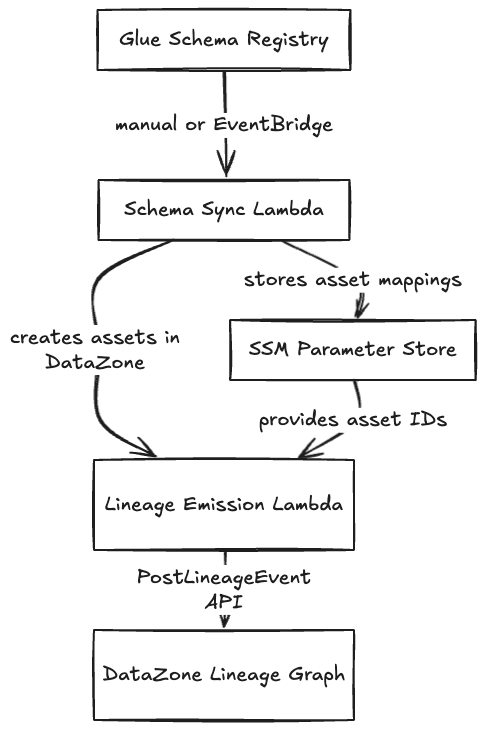
In the end, it was more moving parts than “configure Debezium and go.” But it works reliably, and it gives us control over each integration point. When something breaks, we know exactly where to look.
Some things outside our scope: the first hop, from source database to Kafka topic. The lineage we shipped covers Kafka to Iceberg, which was the most critical gap. Hooking it up to EventBridge for scheduled and anything additional is a next step for the team.
Given the time constraints, the goal was to prove out the pattern and leave something useful for the team to build on. The Schema Sync Lambda handles the Kafka-specific use case, but the Lineage Emission Lambda is intentionally generic: it just constructs and posts OpenLineage events. The team could adapt it to read from CloudWatch logs, hook it up to other event sources, or extend it for Glue jobs and Airflow DAGs. In this case, we gave them building blocks for them to work on the whole system.
What We Learned#
DataZone’s extension model takes time to learn. Smithy definitions, immutable form types, versioned asset types most of this came from trial and error, because the documentation is sparse. Budget a little bit more time for this.
Cross-account IAM is always more friction than expected. The governance layer lived in one account, data sources in another. Getting Lambda to assume the right roles and have the right permissions took some iterations.
Going manual first was the right call. It’s easy to skip the console phase when you’re in a hurry. Try not to. Building by hand before automating saved us from automating the wrong thing.
Encoding edge cases will find you. Always test with real and messy inputs, especially if those inputs can contain special characters.
Lineage Is an Engineering Problem#
Governance tends to get filed under “business concern.” But the absence of lineage creates work that lands directly on engineers. It’s engineers who dig through code to answer “where does this data come from?”. It’s engineers who lose hours tracing broken dashboards by hand. It’s engineers who can’t delete that mystery table because they can’t prove it’s safe to do so.
With lineage, that colleague asking “where does this data come from?” has an answer that doesn’t require reading the code.
Wrapping Up#
In this case, we didn’t set out to solve “governance” for the whole organization. We had tables and Kafka topics that were getting hard to track, and we needed a way to connect the dots.
For example, one thing worth revisiting: the Lineage Emission Lambda relies on naming conventions to map Kafka topics to Iceberg tables. That works until it doesn’t, as naming drift is a real risk. A natural next step would be replacing that assumption with an explicit mapping, either stored in configuration or derived directly from the sink connector metadata.
Lineage is the “where did this come from” piece of governance. There’s also the “what is it” piece (data quality, contracts, trust) and the “who owns it” piece. Each one is its own problem worth solving, and this is a foundation to build on.
Originally published on Loka Engineering on Medium.
Tags